Page 1 of 1
Total Required Space
Posted: Wed Jan 18, 2017 9:36 am
by SebSpiers
Re: Total Required Space
Posted: Wed Jan 18, 2017 11:08 am
by FrancescoT
Dear SebSpiers,
by default the TotalRequiredSpace Label gets populated via "Dialog Object Behavior". Doesn't exist any Pre-Defined variable at such purpose.
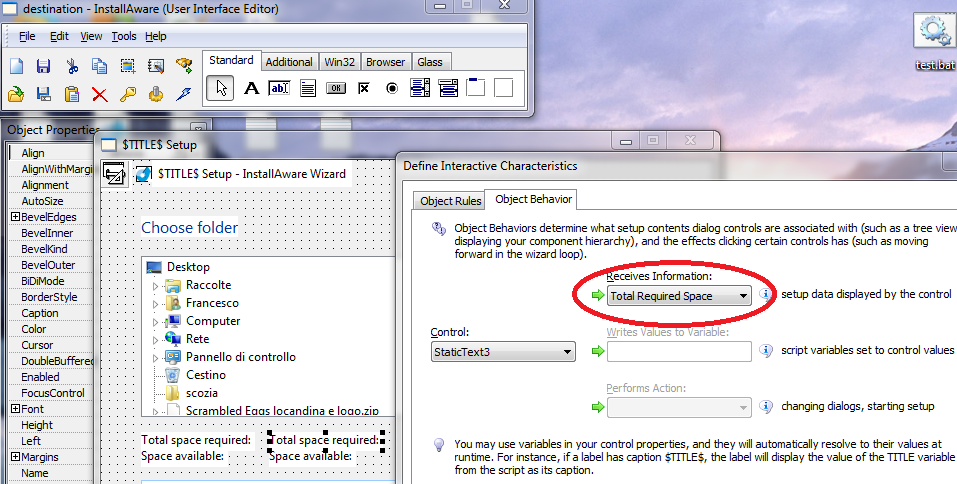
- disk_space.png (204.25 KiB) Viewed 6388 times
As reported by the IA Documentation;
Disk Space Calculations
If your products installation is reporting estimated disk space requirements as 0 or inaccurately, you are not making proper use of the Get Component State command in your script. InstallAware requires this command be used at least once in your installation to be able to accurately predict target disk space requirements. Please see the command reference for more information.
In case you want to display the value of a variable using a label dialog control;
- in your script, declare and intialialize your variable (Set Variable MY_VAR to xxxx) before to display the dialog.
- Load the dialog into the Editor.
- enter $MY_VAR" into the "Caption" property of the label.
- select "NONE" with the "Receives Information" field in "Dialog Object Behavior" (From Dialog Editor, double click the Label Control).
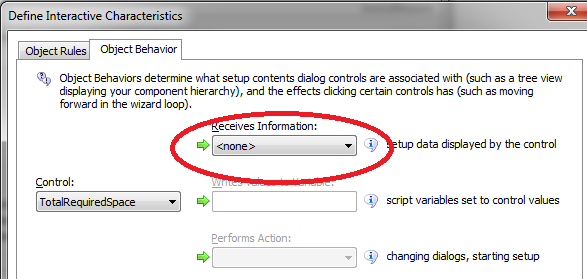
- Object_b.png (26.57 KiB) Viewed 6388 times
Hope this helps you.
Regards
Re: Total Required Space
Posted: Wed Jan 18, 2017 11:29 am
by SebSpiers
That is very helpful thank you.
I now need to figure out how to format the value from bytes into MB to match the RemainingSpace value.
Re: Total Required Space
Posted: Thu Jan 19, 2017 10:02 am
by FrancescoT
You may have a look at the "Check Disk Space sample" from;
viewtopic.php?f=2&t=6772
Regards
Re: Total Required Space
Posted: Thu Jan 19, 2017 10:08 am
by SebSpiers
Yeah I looked at that, but it doesn't allow you to reformat the number, for example, 1000000 to 1,000,000.
Re: Total Required Space
Posted: Thu Jan 19, 2017 2:55 pm
by FrancescoT
You may use the "Parse String" command to modify your values as you prefer.
Regards

