Page 1 of 1
Custom variables do not resolve
Posted: Mon Nov 09, 2020 10:11 am
by kai.damm
I try to select a source path for a helper program from a variable:
Code: Select all
Set Variable MyVersion to 0.8
...
Install Files #PROJDIR#\..\Helper-$MyVersion$\helper.exe to $TargetDir$\helper
But the setup build bails out with
No files matching pattern <TempDir>\Helper-$MyVersion$\helper.exe
Can't I use custom variables like that?
Thanks!
Re: Custom variables do not resolve
Posted: Mon Nov 09, 2020 10:53 am
by FrancescoT
The Install File "Source Files" parameter gets resolved at compile time, and consequently script variables are not allowed.
You may eventually use a Custom Compiler Variable with this field.
Hope this helps you.
Re: Custom variables do not resolve
Posted: Tue Nov 10, 2020 4:39 am
by kai.damm
Thanks. Compiler Variables were actually the first thing I tried: I need to set another version value depending on another compiler variable:
(#MyVersion# is set to 0.8 in project options)
Code: Select all
[compiler if Variable CUSTOMER Equals FOO]
  Set Variable #MyVersion# to 0.9
[compiler end]
Install Files #PROJDIR#\..\Helper-#MyVersion#\helper.exe to $TargetDir$\helper
I'm not sure about the way to set #MyVersion#, but I can't seem to find how to do it in script, and there is no command "compiler variable set" or "set compiler variable".
The result with above code is: It still resolves to "0.8".
Re: Custom variables do not resolve
Posted: Tue Nov 10, 2020 12:54 pm
by FrancescoT
With the script code you can define a SCRIPT VARIABLE and NOT a COMPILER VARIABLE.
Compiler variables (identically as it is with any other development tool) must be defined with the project (SHIFT+CTRL+F11).
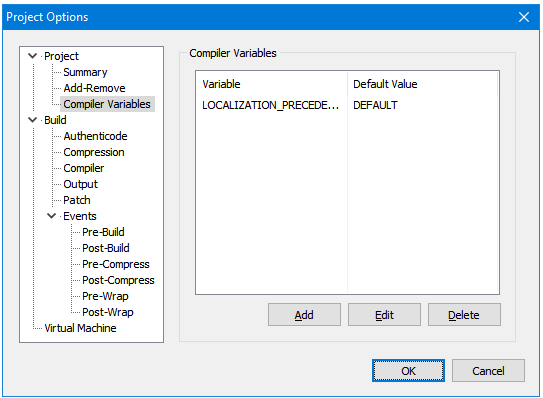
- prj_options.png (11.24 KiB) Viewed 4409 times
For more details, please search for compiler variable in the IA documentation.
Hope this helps you.
Re: Custom variables do not resolve
Posted: Wed Nov 11, 2020 5:09 am
by kai.damm
Thanks, I will duplicate the code paths for the two versions then.