Page 1 of 1
Problem with REG_MULTI_SZ Strings
Posted: Thu Apr 29, 2021 8:22 am
by Sheri_Steeves
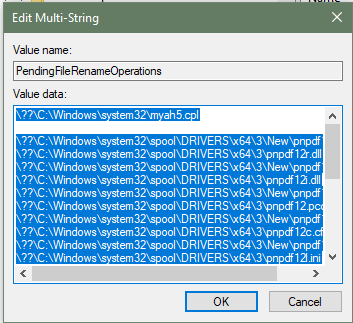
I am having issues reading a REG_MULTI_SZ string from the registry. I need to test this string for certain values.
The issue seems to be if there is an empty string in the middle of the list of strings, all other strings after that get ignored. I am not in control of the contents of this string, I just need to test.
For example:
- image.png (22.8 KiB) Viewed 10089 times
If I look for a value listed in the strings after the blank line, I never find them.
In my MSICode, I am searching the returned string as follows:
Set Variable PENDINGFILERENAMELIST to
Read Registry Key HKLM\SYSTEM\CurrentControlSet\Control\Session Manager\PendingFileRenameOperations into PENDINGFILERENAMELIST
if Variable PENDINGFILERENAMELIST not Equals
Comment: MessageBox: DEBUG, $PENDINGFILERENAMELIST$
Get String Position of "PNSVC12.EXE" in "$PENDINGFILERENAMELIST$" into variable NEEDSREBOOTFROMDRIVER (ignore case)
if Variable NEEDSREBOOTFROMDRIVER Equals 0
Get String Position of "PNSRV12.EXE" in "$PENDINGFILERENAMELIST$" into variable NEEDSREBOOTFROMDRIVER (ignore case)
end
end
How can I skip and/or remove the empty string? Is there a better way to search for the string? Can I remove the newlines somehow?
Re: Problem with REG_MULTI_SZ Strings
Posted: Thu Apr 29, 2021 1:16 pm
by FrancescoT
Please have a look at the following snippet.
This creates a Multi String key under "HKLM\SOFTWARE\Test\TestMulti" (which gets re-redicted under the respective "WOW6432Node" by the OS ), and where the third element of the multi-string is empty.
At such purpose, I used the following pattern to fill the multing string value: "A
$NEWLINE$B
$NEWLINE$$NEWLINE$C
$NEWLINE$D
$NEWLINE$E
$NEWLINE$F".
Then "Read Registry key" to get the entire multi-string, and "For each" to iterate over the multi-string elements.
Code: Select all
Set Variable NATIVE_ENGINE to TRUE
Write Registry Key HKLM\SOFTWARE\Test\TestMulti, A$NEWLINE$B$NEWLINE$$NEWLINE$C$NEWLINE$D$NEWLINE$E$NEWLINE$F
Set Variable MY_MULTI_STRING to
Read Registry Key HKLM\SOFTWARE\Test\TestMulti into MY_MULTI_STRING
MessageBox: Debug, MY_MULTI_STRING=$MY_MULTI_STRING$

for each Element MY_STRING in $NEWLINE$ delimited Collection of $MY_MULTI_STRING$ do
 MessageBox: Debug, MY_STRING=$MY_STRING$
next

Delete Registry KEY HKLM\SOFTWARE\Test\*.*
Set Variable NATIVE_ENGINE to FALSE
Code: Select all
~InstallAware Clipboard Data~
~Set Variable~
~{382F749C-CDCC-4150-A623-EE203F789E78}~
~NATIVE_ENGINE$MYAH$MYAH$FALSE~
~FALSE~
~Delete Registry~
~{D1AF4782-0C34-49B8-9B19-B49CB97D625C}~
~2|~
~SOFTWARE\Test~
~~
~TRUE~
~Comment~
~{03B959BF-A41A-4D80-B23A-D7F145B10275}~
~~
~Next~
~{1262F951-19B1-4A15-BB8A-D3CECF3838C9}~
~MessageBox~
~{48C2C932-FDD3-4703-BAED-CBE2092A683F}~
~Debug~
~MY_STRING=$MY_STRING$~
~0~
~1~
~~
~For Each~
~{084D6E43-BA24-47F1-B22E-3CDDAFE833AD}~
~MY_STRING~
~$NEWLINE$~
~$MY_MULTI_STRING$~
~Comment~
~{CBA0B46B-2401-417A-B804-05EEA737343E}~
~~
~MessageBox~
~{9B4088F6-F1EC-4E4F-8B92-AF18B6154FAB}~
~Debug~
~MY_MULTI_STRING=$MY_MULTI_STRING$~
~0~
~1~
~~
~Read Registry~
~{7B3293B3-4475-498F-8804-392DCE8D88DF}~
~MY_MULTI_STRING|~
~2~
~SOFTWARE\Test~
~TestMulti~
~Set Variable~
~{A3D5C97A-0A95-4D12-8B48-8B4BBCC566FB}~
~MY_MULTI_STRING$MYAH$MYAH$FALSE~
~~
~Write Registry~
~{16655225-0C23-464A-96B6-DBFEEE301EB3}~
~0~
~2|~
~SOFTWARE\Test~
~TestMulti~
~A$NEWLINE$B$NEWLINE$$NEWLINE$C$NEWLINE$D$NEWLINE$E$NEWLINE$F~
~FALSE~
~APPEND~
~Set Variable~
~{2DF9440E-CEC2-435C-B482-23E8034CB36C}~
~NATIVE_ENGINE$MYAH$MYAH$FALSE~
~TRUE~
Hope this helps you.
Re: Problem with REG_MULTI_SZ Strings
Posted: Fri Apr 30, 2021 1:45 pm
by Sheri_Steeves
This looked promising but still did not allow me to get at the strings after the blank line.
My message box displayed the first line, once at the outside reading the key, and once in the for each loop, then left.
Code: Select all
        Set Variable NATIVE_ENGINE to TRUE
        Set Variable NEEDSREBOOTFROMDRIVER to 0
        Set Variable PENDINGFILERENAMELIST to
        Read Registry Key HKLM\SYSTEM\CurrentControlSet\Control\Session Manager\PendingFileRenameOperations into PENDINGFILERENAMELIST
        if Variable PENDINGFILERENAMELIST not Equals

          MessageBox: DEBUG, $PENDINGFILERENAMELIST$

          for each Element FILERENAME_STR in $NEWLINE$ delimited Collection of $PENDINGFILERENAMELIST$ do

            MessageBox: DEBUG, $FILERENAME_STR$

          next
          Set Variable NATIVE_ENGINE to FALSE
Re: Problem with REG_MULTI_SZ Strings
Posted: Mon May 03, 2021 10:13 am
by FrancescoT
Do you have any chance to share an export (*.reg) of that REG-KEY?
Re: Problem with REG_MULTI_SZ Strings
Posted: Mon May 03, 2021 11:02 am
by Sheri_Steeves
I do have a saved .reg as it made it easier to test myself.
I've attached RegTest.zip, which contains RegTest.txt. Just change the extension from .txt to .reg.
It contains a multi_sz key that exhibits the issue. The contents of this key were created while uninstalling/upgrading/installing using our product setups created with InstallAware.
You may want to change the path to the key in the .reg for your testing as the actual key I need to use and have given here is the PendingFileRenameOperations key that gets used on reboot.
Re: Problem with REG_MULTI_SZ Strings
Posted: Mon May 03, 2021 1:22 pm
by FrancescoT
Ok, I'll let you know.
Re: Problem with REG_MULTI_SZ Strings
Posted: Tue May 04, 2021 12:32 pm
by FrancescoT
Dear Shery,
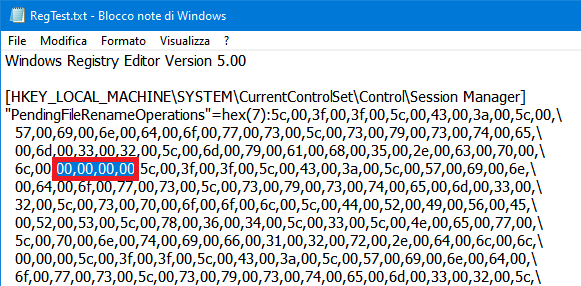
unfortunately it exists a problem with the multi-string data.
- reg.png (19.74 KiB) Viewed 10044 times
The pattern "00,00,00,00" indicates the termination of a multi string sequence.
So there isn't any empty string in your multi string sequence, but instead the multi-string sequence terminates just after the first string.