Page 1 of 1
Include an internet link/url in the $SHORTCUTFOLDER$
Posted: Sun Aug 27, 2006 2:38 pm
by BobRoush
How can I include a internet shortcut/link/url in the Start Menu shortcut folder?
Posted: Sun Aug 27, 2006 4:47 pm
by MichaelNesmith
No different than creating any other shortcut - just type in the full URL of the desired Internet resource, instead of a program name.
Re: Include an internet link/url in the $SHORTCUTFOLDER$
Posted: Thu Jun 07, 2012 7:59 am
by Garrido
I just can´t create them. Please, look:
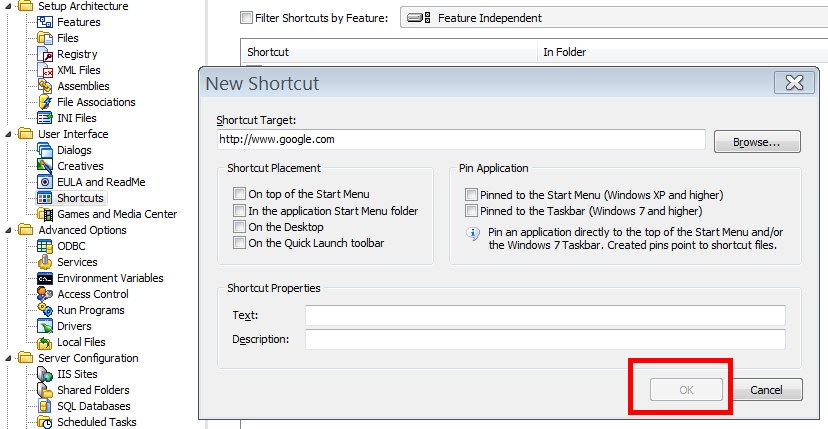 Note: The Ok button is not enabled.
Re: Include an internet link/url in the $SHORTCUTFOLDER$
Posted: Thu Jun 07, 2012 8:41 am
by FrancescoT
Dear Garrido,
add it in your MSI script instead of using the IDE shortcut dialog.
example:
Code: Select all
Create Shortcut $SHORTCUTFOLDER$\My web link to http://www.google.it/
Code: Select all
~InstallAware Clipboard Data~
~Create Shortcut~
~{3C66DF0C-9583-4617-B171-202DF7C61E58}~
~http://www.google.it/~
~My web link~
~$SHORTCUTFOLDER$~
~My web link description~
~~
~~
~|FALSE~
~|~
~0|~
Regards
Re: Include an internet link/url in the $SHORTCUTFOLDER$
Posted: Mon Jun 11, 2012 1:49 pm
by Garrido
Where can I find the MSI file? In my disk I only can see the .MIA file.
Re: Include an internet link/url in the $SHORTCUTFOLDER$
Posted: Mon Jun 11, 2012 3:14 pm
by bokkie
Garrido, what I think Francesco is suggesting is that you add his code example into your MSIcode tab in the IDE. Position the cursor at a line where you want to insert the statement.
I assume that you are using the Studio Admin version of IA?
Re: Include an internet link/url in the $SHORTCUTFOLDER$
Posted: Tue Jun 12, 2012 7:15 am
by FrancescoT
In fact, I meant this.
To be more precise, the MSI scripting feature is available with InstallAware Developer, Studio and Studio Admin editions.
Regards