Page 1 of 1
Bug in (spanish) language selection dialog
Posted: Fri Mar 26, 2010 6:35 am
by alibaba
Hi,
seems like the language selction dialog wasn't testet on spanish systems (see attached image):

Re: Bug in (spanish) language selection dialog
Posted: Tue Aug 17, 2010 2:03 am
by alibaba
hey guys,
what can I do here. I cannot edit this dialog and also don't want to build my own language selection....
Re: Bug in (spanish) language selection dialog
Posted: Tue Aug 17, 2010 12:58 pm
by mills
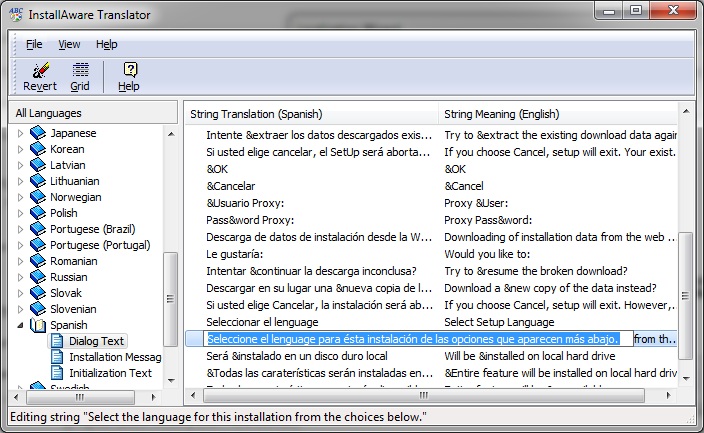
From the localization wizard, choose "Import strings from translator to project" at the bottom.
Choose the languages to import.
On the "Completing the Localization Wizard" screen, click on "Edit Installer Messages" button.
- translator.jpg (146.89 KiB) Viewed 18716 times
From here, you can modify the message.
Re: Bug in (spanish) language selection dialog
Posted: Wed Aug 18, 2010 1:44 am
by alibaba
Yes it is a workaround, thanks. But why doesn't the standard text fit in the standard dialog? It is a bit unsightly.
Re: Bug in (spanish) language selection dialog
Posted: Wed Aug 18, 2010 5:47 pm
by mills
Yes, we will need to fix that.
I'd just like clarify. Were you testing this on an OS with the language settings set to Spanish or was the installer settings set to Spanish on an OS with its language set to English?
Re: Bug in (spanish) language selection dialog
Posted: Wed Aug 25, 2010 2:22 am
by alibaba
It was a spanish one, otherwise the dialog wouldn't appear in spanish language.
A native spanish system Win7.
Re: Bug in (spanish) language selection dialog
Posted: Wed Aug 25, 2010 12:38 pm
by mills
Thanks. I figured that must be the case, since this appeared in another OS with Italian language. We'll be fixing this and improving some of the translations in the future.
Re: Bug in (spanish) language selection dialog
Posted: Thu Aug 16, 2012 8:00 am
by ckaware
This is still an issue with IA 2012. Please address in the next release. Please add UNICODE SUPPORT!!!
Re: Bug in (spanish) language selection dialog
Posted: Thu Aug 16, 2012 11:44 am
by FrancescoT
... not with the next one ... I suppose.
Re: Bug in (spanish) language selection dialog
Posted: Mon Oct 08, 2012 7:29 am
by alibaba
In which ressource file I can edit this dialog? Since IA does not seem to be willing to fix this (for over 2 years!) I have to do it for my own.
Re: Bug in (spanish) language selection dialog
Posted: Mon Oct 08, 2012 8:46 am
by FrancescoT
Dear User,
as reported with a previous reply by "mills » Tue Aug 17, 2010 7:58 pm" ... that resource text is available as Shared Strings.
Regards
Re: Bug in (spanish) language selection dialog
Posted: Tue Oct 09, 2012 1:57 am
by alibaba
Dear Francesco,
I don't want to edit the text-ressource. My goal is to edit the dialog dimension itself that the pre-defined text fits in the dialog.
Thanks!
Re: Bug in (spanish) language selection dialog
Posted: Tue Oct 09, 2012 7:11 am
by FrancescoT
Dear Alibaba,
Actually, as you probably know aready know, that it is not possible through an IA tool ... I suppose that only using a Resource Editor it can be possible ( ... but I suppose that you already know this too).
Regards
Re: Bug in (spanish) language selection dialog
Posted: Wed Oct 10, 2012 4:20 am
by alibaba
Yes I know this

and I did this already for the (first) unzip-dialog within dependent.exe. But I do not know which file to open in ressource-editor to hack the language selection dialog.
Re: Bug in (spanish) language selection dialog
Posted: Thu Oct 11, 2012 7:27 am
by FrancescoT
Dear Alibaba,
This is not contained inside a .rc or .res file, it is not a standard Windows resource.
However, a specific Delphi resource editor can be used on interop\miastub.exe.
By the way, I believe that it is much more easy to suppress this dialog and make your own selector.
Regards.