Page 1 of 1
Why does update setup 2 runonce entries (All users and Me)
Posted: Wed Aug 25, 2010 8:14 am
by gsaunders
When enabling the default "Schedule updates" I see the installer creates two run once registry entries.
When I manually run them one will fail (just me) and the other works (all users). Why is it doing it two times?
Shouldn't it know how the application is setup and ONLY do the registry entry for either All Users or Just Me?
I know I can add code to do this, but shouldn't it handle this by default????
Re: Why does update setup 2 runonce entries (All users and M
Posted: Wed Aug 25, 2010 3:02 pm
by mills
I'd just like to make sure what you're doing, because you mention both scheduling updates and manually running them.
On the Project properties page, did you choose Manual update checking or Schedule updates?
Re: Why does update setup 2 runonce entries (All users and M
Posted: Wed Aug 25, 2010 3:35 pm
by gsaunders
In this test I am doing scheduled updates.
I see two entries in the HKCU run once location.
I was just saying that if I took both key values and ran them individually one fails and the other doesn't. I just wanted to manually see what those entries were going to do.
So it is a scheduled update in this test. Just wondering why it put two entries in the run once. One for All Users and one for Just Me. It should just put the correct one in there shouldn't it?
Re: Why does update setup 2 runonce entries (All users and M
Posted: Wed Sep 24, 2014 5:03 pm
by tofutim
We just ran into this as well. Any insight?
Re: Why does update setup 2 runonce entries (All users and M
Posted: Thu Sep 25, 2014 12:07 pm
by tofutim
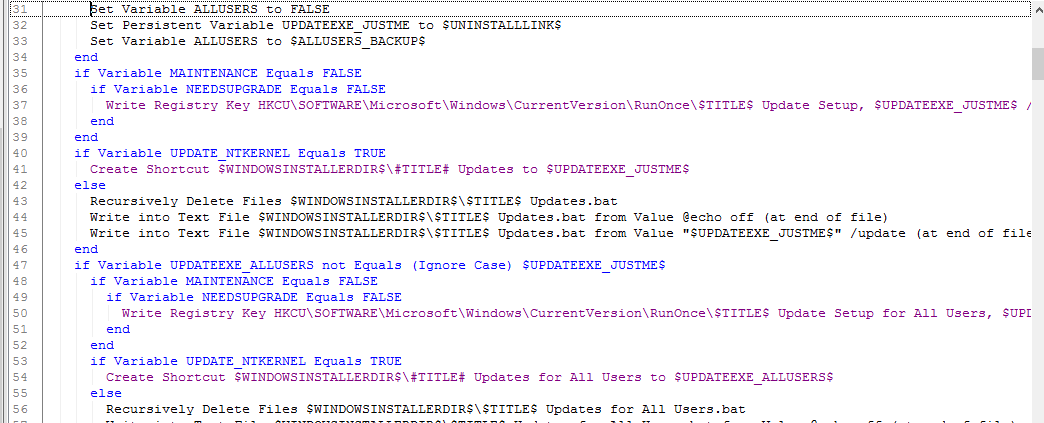
- 2014-09-25_1131.png (51.34 KiB) Viewed 6733 times
Here is the offending (?) code. Looks like it is trying to upgrade both the all users and me.
Re: Why does update setup 2 runonce entries (All users and M
Posted: Fri Sep 26, 2014 11:54 am
by FrancescoT
Let me check it!
Regards