Page 1 of 1
GroupBox caption's font color
Posted: Wed Sep 01, 2010 12:43 am
by HAHNmediaservice
In our setup the GroupBox caption's "Zielordner" and "Speicherplatz" are always blue font color:
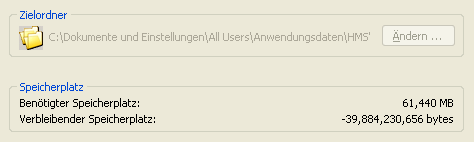
- GroupBox.PNG (6.03 KiB) Viewed 4515 times
How is it possible to change the font color to e.g. black? The font property itself has no effect ...
Please advise ...
Re: GroupBox caption's font color
Posted: Wed Sep 01, 2010 2:23 pm
by mills
You're right. It seems that the groupBox's font color has no effect on the groupBox's caption nor labels within it.
You can work around this by removing the groupBox's caption (or making it spaces). You can add a label to the groupBox and use that as the caption. Set the color of the label as desired.
Re: GroupBox caption's font color
Posted: Thu Sep 02, 2010 12:28 am
by HAHNmediaservice
This we tried already a few days ago an it does'nt work this way. Now, we completly removed all controls in the dialog and replaced them again. Now it work's fine. Thank you!
Another question to font color's regarding the "Edit" control displaying the "FolderText" (select folder of browse folder dialog): The Edit control itself is editable but in context of selecting a folder which will be displayed in there this makes no sense. What we did, we made the Edit control "Enabled = False". This works fine, but the font is gray ... and we like to have it black. Any solution for that?
Re: GroupBox caption's font color
Posted: Thu Sep 02, 2010 3:19 pm
by mills
Unfortunately, labels and static text controls don't provide the functionality to "obtain value from written variable" like edit controls do, but I don't see why not. I've added this as a feature request.
In the mean time, you'll have to allow users to edit the text or display it in gray.