Page 1 of 2
Very weird problem
Posted: Tue Oct 19, 2010 1:34 pm
by CFConner
Ok, this is a scenario I didn't test and we rolled it out to a customer who came across the following.
I produced an installation that works just great with the EXE installation. But since they are using Active Directory to push out the installation, I also produced for them the MSI file using the Group Policy Wizard.
When the customer did a test deployment using Active Directory, it failed. So they manually ran the MSI package directly, and I can see that it is trying to download the web media block instead of using the file that is in the current directory! For the hell of it, they put the files on their web server and the files then installed.

They do NOT want to use their web server to install the software - as our customer has 17 branches. Instead, in group policy, they specify the share location for each branch to install from a local share at the branch so they are not killing network bandwidth. 300 workstations doing a large upgrade hitting one web server isn't going to cut it.

I fired up my VM of Windows x64 to test it myself. Sure enough, If I run the EXE - it will see the files in the network share no problem. If I run the MSI package that was converted by the Group Policy wizard, it expects that the source files are web download ONLY and will not see the 7zip files in the local directory.
I am running InstallAware 9 R2.
=-Chris
Re: Very weird problem
Posted: Tue Oct 19, 2010 9:35 pm
by mills
How did you test this in VMWare? Did you set up a mapped network drive?
In the GPO deployment (customer) environment, did you change anything as to where the media blocks point to? You did mention they put it on their web server. Did you also try to direct to the (local) network path, but that didn't work?
Re: Very weird problem
Posted: Thu Oct 21, 2010 9:54 pm
by CFConner
Ok, I can reproduce this.
I installed a fresh new VM with Windows 7 Enterprise x64. I didn't bother with any windows updates (since this is a quickie test). (VM-InstallAware)
I installed InstallAware 9 R2 with no issues.
I installed the license.
I created a new project using basic setup.
I then added just two runtime components. I used x64 for testing. So I chose the 64 bit runtime of VC Runtime 10 and MSXML 6.0 x64.
I changed the project properties to target x64.
I successfully built and installed the AD Test project running the EXE.
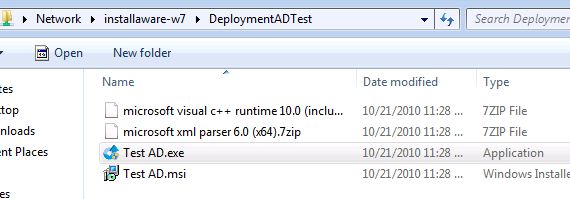
- TestShot1.JPG (31.99 KiB) Viewed 47676 times
On the pre-req screen, you can see the VC Runtime:
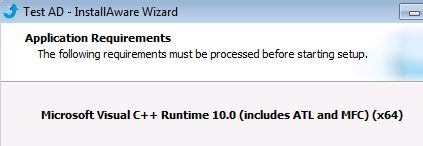
- TestShot2.JPG (19.27 KiB) Viewed 47676 times
Here, you can see it install the VCRuntime with no problems:
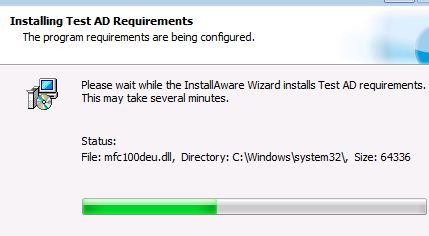
- TestShot3.JPG (24.66 KiB) Viewed 47676 times
See next post so I can continue to upload screen shots (I'm limited to 3)
Re: Very weird problem
Posted: Thu Oct 21, 2010 10:01 pm
by CFConner
I then go to ADD/REMOVE programs and Uninstall the VC Runtime 10.
I double click the MSI package this time - NOT THE EXE. The installation runs fine:
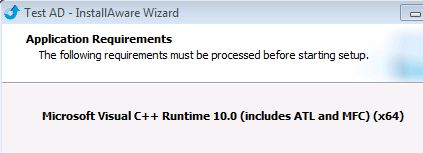
- TestShot4.JPG (18.88 KiB) Viewed 47676 times
Then I remembered something important - something I didn't get from my testing because I ALWAYS tested the EXE first before doing the AD deployment - I remembered that the package may leave files on the drive (due to my type of install where there is no APPLY INSTALL since I only install pre-reqs here and do not need my own installation showing up in add/remove programs)
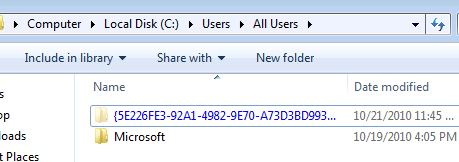
- TestShot5.JPG (24.56 KiB) Viewed 47676 times
Here I find the installation file folder. To verify that it is indeed the VC Runtime files, I look inside the folder:
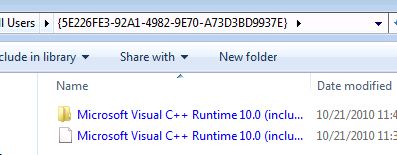
- TestShot6.JPG (23.6 KiB) Viewed 47676 times
Yup - its the VCRuntime files. I'm going to blow away this folder...
See next post:
Re: Very weird problem
Posted: Thu Oct 21, 2010 10:19 pm
by CFConner
Here you can see I removed the folder:
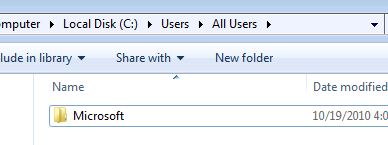
- TestShot7.JPG (19.12 KiB) Viewed 47676 times
I go into add/remove programs and uninstall the VC Runtime 10 since the MSI package installed it successfully.
Now I am going to run the MSI package again from the NETWORK SHARE like I did previously. (It succeeded previously too!)
When I launch the AD Test.msi package, everything looks good - the pre-req screen shows me this:
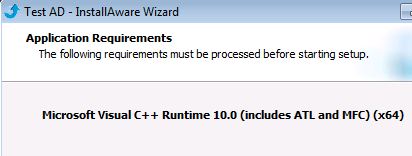
- TestShot8.JPG (19.34 KiB) Viewed 47676 times
But when I click the NEXT button to start the install, I get this ugly thing:
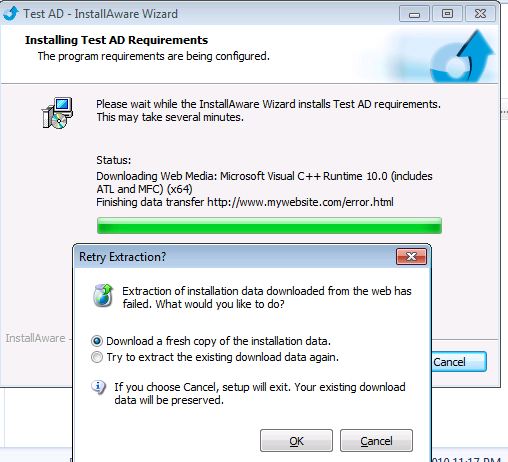
- TestShot9.JPG (53.63 KiB) Viewed 47676 times
This tells me WHY my GPO's are failing - and ALSO why they "succeeded" in the past. They succeeded in the past because the previous EXE "installation test" left the files behind. When I manually removed the files from add/remove programs and applied the GPO deployment, it was successful because it found the sources already on the machine locally.
If I remove the sources from the local machine as shown above and run the MSI package, it doesn't see my files on the network share which is EXACTLY what Group Policy Deployment does. In my real application deployment, I have a valid URL for downloading the packages - but I leave it up to my customers to choose to use it.
This HAS to be a bug or there has to be a way I can fix this....
You can test this without having to do a GPO deployment - but at least now I understand why it fails and why it succeeded previously.
I copied the files to the local drive into a temporary folder and tried to install the files from the local source and it failed with the same message - that it couldn't download the source. Ignore the fact that I have an invalid URL - I expected it to see the files in the local folder since they were there. I do expect that if it DID NOT see the files there, that it would go out and fetch it. This is the behavior the of the EXE - if I run it and the media block isn't there, it will go fetch the file from the URL. I have tested this situation and it does work.
I KNOW that the installation will work if I create an SINGLE EXE and use the GPO to convert it to an MSI. The biggest problem with that is that my application will be around 150MB. That means, sure the first time a client has to install updates, it needs all 150MB worth of pre-reqs, but the next time we release a new version of our client, they have to push out a 150MB file to a workstation, then it extracts all the stuff, finds out it doesn't need anything and I've wasted a ton of bandwidth.
Instead, with this solution, I have a very small MSI package (2MB) that has all the rules in it - if it needs a file - bang its there for it to use on demand - either in the current directory it was executed from or the web media block location URL.
If you want me to upload this measley project that I used for testing, let me know. To get our customer off the ground for their deployment, I'm going to give them the single file but I hope we can work out a solution so I don't get killed on the amount of bandwidth my pre-req introduces to our clients.
=-Chris
Re: Very weird problem
Posted: Thu Oct 21, 2010 10:42 pm
by CFConner
Ok, I have two more screen shots to show... then I'll get some sleep.
I modified the project to show me two properties, the SFXPATH, and the GPOPATH when the MSI file is manually run:
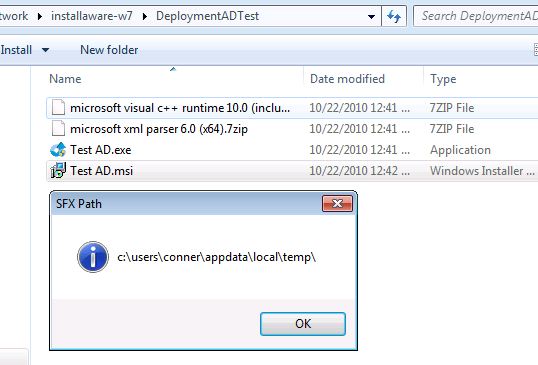
- TestShot10.JPG (39.73 KiB) Viewed 47675 times
Here we see the GPOPATH and it is correct!
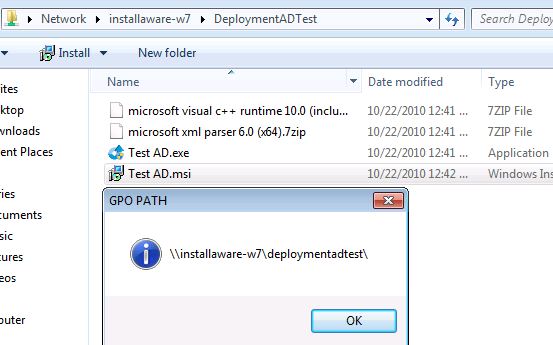
- TestShot11.JPG (40.81 KiB) Viewed 47675 times
So this tells me that the web deployment MSI package DOES KNOW where it was executed from. Why isn't it looking for its sources first from the folder it was executed from and if it is not found then move on to the defined URLs in the web media block? If I run the EXE, it has no problems and works correctly.
Thanks guys, (you DO ROCK), I hope you correct / fix this soon.
Or at least tell me I'm an idiot and didn't set up my project correctly.
=-Chris
Re: Very weird problem
Posted: Fri Oct 22, 2010 7:32 pm
by mills
I've reproduced this and here are my results:
Test 1
------
Create new basic setup.
Add runtime: VC 10 (x64).
Check off 64-bit OS in Application Requirements.
Build web-based exe.
Create GPO msi based off the web exe.
Install from msi
Result:
During Prereq (runtime) install, error appears:
Extraction of install data downloaded from wed failed...
Test 2
------
Same as above, except chose Crystal Reports (x64).
Result:
During Prereq (runtime) install, error appears:
This operation returned because the timout period expired.
Then another error appears (same as before):
Extraction of install data downloaded from wed failed...
Test 3
------
Same again, using Visual Studio 2008 Report Viewer
Result:
Same as test 1.
Re: Very weird problem
Posted: Fri Oct 22, 2010 7:34 pm
by mills
So, in short, it looks like there is a bug in that the web media blocks aren't being packaged into the installer.
However, my suspicion is that this may be as designed (being that the goal would be to distribute the smallest msi possible and only requiring downloads for needed prerequisites).
I'm going to pass this by our developers.
However, in the mean time, I'd recommend you use a single (non-web) exe to build the GPO msi with if that will work for you in this situation.
Re: Very weird problem
Posted: Mon Oct 25, 2010 1:33 pm
by CFConner
Thanks, but I would like to point out in your documentation:
Deploying Web Builds Offline
A new feature in InstallAware 3.0 is the ability to deploy your entire web builds offline. If the main setup executable
can locate some or all of the web media blocks it requires directly in the same folder as itself, it will first attempt to use these local copies of the web media blocks, instead of downloading them. If this attempt fails, or for web media blocks which cannot be found locally, setup will download from the web.
This option is primarily intended for use in quick deployment and testing scenarios. If you do not intend to download web media blocks during installation, Compressed or Uncompressed builds will always deliver better performance.
----------------------------------------
This is the behavior I expect, but I am not getting when I convert the web build EXE to the MSI package. I think it may be a bug that has cropped up that is all.
=-Chris
Re: Very weird problem
Posted: Mon Oct 25, 2010 4:25 pm
by mills
By the description you quote, it is behaving "technically" to that description. The msi is not an executable. By running the GPO-msi, it does extract the exe to a temp folder located at something like:
C:\Users\AllUsers\AppData\Local\Temp\mia696D.tmp
If the web media blocks were placed there, then it should work. Of course, it's far from a "usable" use-case.
At the very least, I've added a feature request to add an additional option to allow the user to "point to" the sources if they can't be found (in the same folder or at the URL). This should help avoid/work-around this problem and any similar which might pop up.
Re: Very weird problem
Posted: Mon Oct 25, 2010 4:31 pm
by mills
One thing did come up during a discussion with a developer. Did you try using a (network) file path instead of a URL?
Re: Very weird problem
Posted: Tue Oct 26, 2010 12:41 pm
by CFConner
No - I am not using a file path.
I just heard back from the customer in regards to the deployment (I used the single file MSI as you suggested). As predicted, it ate a large amount of their bandwidth and they are not happy.
Many of their workstations already had the .net framework 4.0 installed, but since I am not using the web build installer group policy version, it makes it impossible.
I suppose what does not make sense to me is why doesn't the "Web build" MSI work as the EXE - as IT IS STILL A WEB BUILD. The EXE version will look in the same directory it was executed from for the source files and if not found it will look at the alternate file locations (such as the URL's provided), but the GPO version (MSI package) does not?
When you mentioned the file URL - it gave me an idea - but I do not know if it will work.
Right now, for the web urls - I have the URL's like this: (example)
http://ProductUpdates/FrameworkX32x64.7zip
Where if the customer wants to use the web based installation - they can. So, as an example, if the installation doesn't find the file in the local directory, it will then try the
http://ProductUpdates/FrameworkX32x64.7zip
For the customer to use this functionality, I require them to create a CNAME in DNS that points to their real web server for "ProductUpdates". This has worked so far. Now, for file updates... that is an interesting idea.
I'll try file://ProductUpdates/sharename/FrameworkX32x64.7zip (is that what you are proposing?) where ProductUpdates is a DNS CNAME record that points to the real machine on their network that has the share in the example here?
In the end though, I really need the MSI package to behave like the EXE - (as it should - it extracts out the EXE when the MSI is executed.) where it will look to the directory it executed from first for its sources if they aren't already packaged as part of the MSI package and do its thing.
I could have sworn this worked before - I am tempted to install InstallAware 9 and see if it does.
=-Chris
Re: Very weird problem
Posted: Tue Oct 26, 2010 2:30 pm
by CFConner
Ok, I'm going to stop beating a dead horse and just let you let me know if I have to live with this. I guess I am just bummed.

In any case, lets see if we can make it work like the EXE with its media blocks when run as the MSI.
Can I dynamically change the web media block location in code so it could point to say file://$GPOPATH$\file.7zip ?
=-Chris
Re: Very weird problem
Posted: Wed Oct 27, 2010 7:42 pm
by CFConner
Ok, I created another test project. This time, I put in - before the default URL (had to hit control-enter on the first one at the beginning) this text:
file://$GPOPATH$Microsoft Visual C++ Runtime 10.0 (includes ATL and MFC) (x64).7zip
When I ran the MSI file directly from a folder, the installation did "download it" and install it just fine!
What this means is that I need to create a code block that will, based on whether the setup was executed as an MSI package, then substitute the correct path information to the MSI package. What I mean is that if the 7zip file is located on a remote network share, then the file: URI syntax is different than if it is executed from a drive system. In addition, I need to make sure that my slashses are correct. (at least I think so).
I am going to play around with it - if it works out just fine - perhaps you guys could have a checkbox or something on the web media block to say "Include file uri" which will precede the default http location that is provided.
Anyway, I'll monkey with this for a few days and get back to you on how I make out. Thanks for the suggestion on trying the file url method.
FYI - there is a windows function called UrlCreateFromPath which is located in SHLWAPI. It will properly take a file path and return the correct file url syntax if anyone is interested in knowing that.
Perhaps I'll get creative and have to try my hand at calling it from my main code. It looks a bit messy though. Ah, life sucks.
This, of course, only matters in terms if the GPOPATH is defined - which means the end-user is running the MSI package.
=-Chris
Re: Very weird problem
Posted: Thu Oct 28, 2010 7:18 pm
by mills
Alright. This is sounding good!
It shouldn't really matter which order the URL comes into. I think that's going to be the easiest way-- to use another url in the media block list.
Yes, we're going to look into having a web-based gpo-msi look in its path, not (or in addition to) the unpacked path.