Page 1 of 1
Web Media Blocks problem
Posted: Fri Nov 19, 2010 7:28 am
by ap3000
I have a installer made for a desktop application that use the Microsoft .NET Framework Client 4. The installer checks for of the OS is 32 or 64 bit and then install the Microsoft .NET Framework Client 4 if is not already installed.
This work OK with Windows XP and Windows Vista. But with Windows 7 both 32 and 64 bit the installation stops when hi seems to have installed Microsoft .NET Framework Client 4. It comes with a "Force Restart" dialog see attachment and if I close this the installer have a error dialog saying "Microsoft .NET Framework Client 4 (x64) could not be installed. Please use Windows update to install this update manual on your system."
If I then restart the system manual nothing happens, but if I then run my installer again hi install my software wit out problems and run it. Thus the Microsoft .NET Framework Client 4 was installed in the first attempt.
How can I solve this problem so that hi install in one attempt on Windows 7?
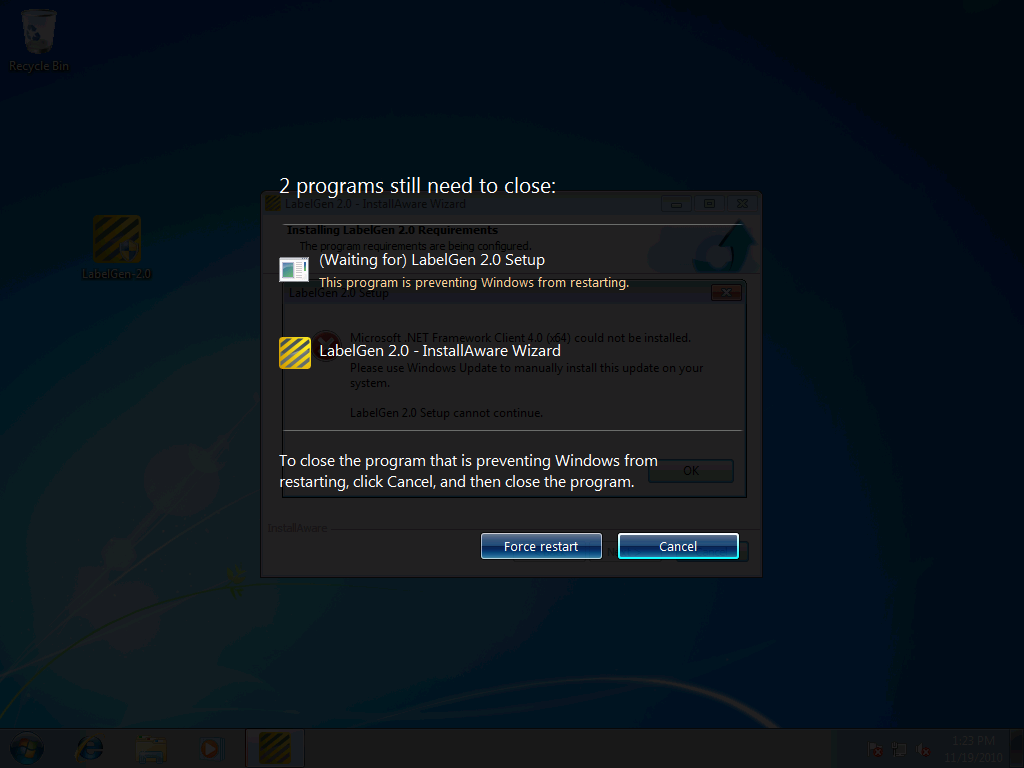
- Force restart
- ForseRestart.png (74.7 KiB) Viewed 19290 times
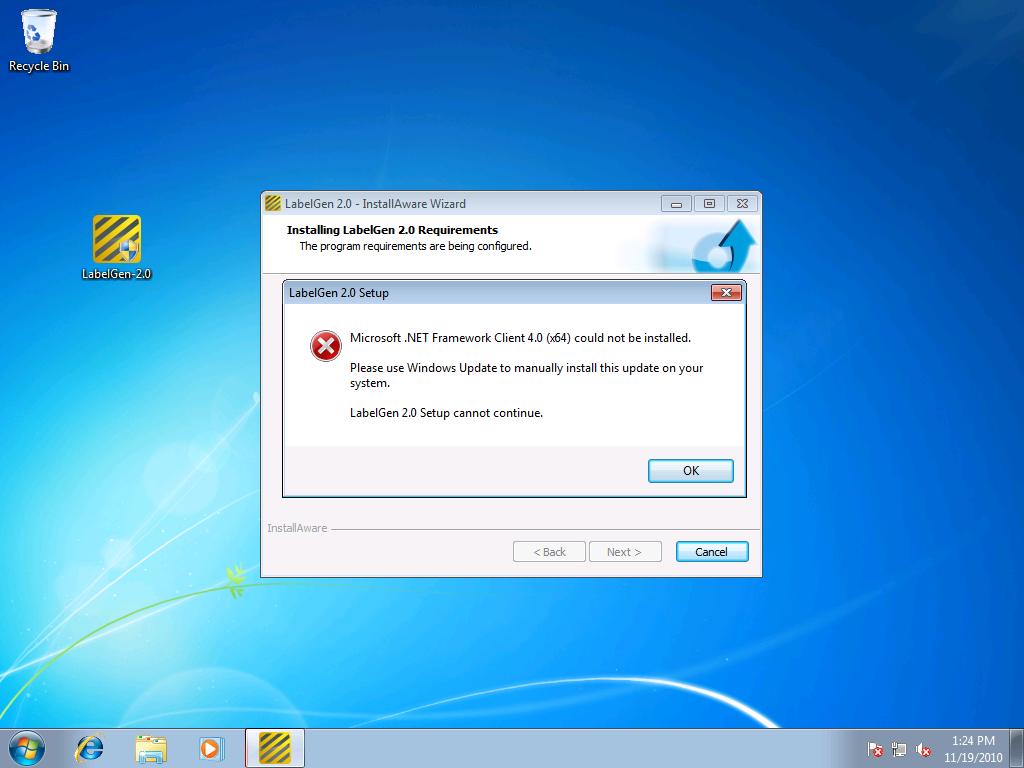
- ErrorMessage.png (221.64 KiB) Viewed 19290 times
Anders Pedersen
Re: Web Media Blocks problem
Posted: Fri Nov 19, 2010 10:20 am
by CFConner
I used a COMBINED x86 and x64 installer for my framework installation. You ONLY NEED THE 64 bit version for BOTH x86 and x64. (Do NOT check the runtime for the x86 version if you want to deploy to both) (Your application runtimes will only have the Microsoft .NET Framework 4 (x64) checked but not the Microsoft .NET Framework 4 one)
Then do the following - this is my CHECK SCRIPT (I called it setupnet4_x64 - note that this is called even for 32 bit OS)
Code: Select all
Set Variable DOTNET40_X64 to TRUE
if Variable ISWINDOWS64BIT Equals TRUE
 Set x64 - Native 64 bit Windows, AMD64 and EM64T Architectures - installation mode
 Set Variable DOTNET40_X64 to TRUE
 Read Registry Key HKLM\SOFTWARE\Microsoft\NET Framework Setup\NDP\v4\Full\Version into DOTNET40_X64
 if Variable DOTNET40_X64 Greater Than (Version) 4.0.30318
   Set Variable DOTNET40_X64 to TRUE
   else
   Set Variable DOTNET40_X64 to FALSE
 end
 Set Win32 - Native 32 bit Windows and Windows 32 on Windows 64 (WOW64) - installation mode
 else
 Set Variable DOTNET40_X64 to TRUE
 Read Registry Key HKLM\SOFTWARE\Microsoft\NET Framework Setup\NDP\v4\Full\Version into DOTNET40_X64
 if Variable DOTNET40_X64 Greater Than (Version) 4.0.30318
   Set Variable DOTNET40_X64 to TRUE
   else
   Set Variable DOTNET40_X64 to FALSE
 end
end
if Variable DOTNET40_X64 Equals FALSE
 Get System Setting Windows 7 into DOTNET40_IS7
 Get System Setting Windows Vista into DOTNET40_ISVISTA
 Get System Setting Windows 2003 into DOTNET40_IS2003
 Get System Setting Windows XP into DOTNET40_ISXP
 Get System Setting Service Pack 1 into DOTNET40_SP1
 Get System Setting Service Pack 2 into DOTNET40_SP2
 Get System Setting Service Pack 3 into DOTNET40_SP3
 if Variable DOTNET40_IS7 Equals FALSE
   if Variable DOTNET40_ISVISTA Equals FALSE
     if Variable DOTNET40_IS2003 Equals FALSE
       if Variable DOTNET40_ISXP Equals FALSE
         Comment: .NET 4.0  is not supported on older Windows versions
         MessageBox: $TITLE$ Setup, $TITLE$ requires at least Windows XP or later. Please upgrade your operating system and try again.$NEWLINE$$NEWLINE$$TITLE$ Setup cannot continue.
         Terminate Installation
         else
         if Variable DOTNET40_SP3 Equals FALSE
           Comment: .NET 4.0  requires Service Pack 3 on Windows XP
           MessageBox: $TITLE$ Setup, $TITLE$ requires at least Service Pack 3 or later. Please upgrade your operating system and try again.$NEWLINE$$NEWLINE$$TITLE$ Setup cannot continue.
           Terminate Installation
         end
       end
       else
       if Variable DOTNET40_SP2 Equals FALSE
         Comment: .NET 4.0  requires Service Pack 2 on Windows 2003
         MessageBox: $TITLE$ Setup, $TITLE$ requires at least Service Pack 2 or later. Please upgrade your operating system and try again.$NEWLINE$$NEWLINE$$TITLE$ Setup cannot continue.
         Terminate Installation
       end
     end
     else
     if Variable DOTNET40_SP1 Equals FALSE
       Comment: .NET 4.0  requires Service Pack 1 on Windows Vista
       MessageBox: $TITLE$ Setup, $TITLE$ requires at least Service Pack 1 or later. Please upgrade your operating system and try again.$NEWLINE$$NEWLINE$$TITLE$ Setup cannot continue.
       Terminate Installation
     end
   end
 end
 Set Variable PREREQ to TRUE
 if Variable ISWINDOWS64BIT Equals TRUE
   Set Variable PRELIST to $PRELIST$$NEWLINE$Microsoft .NET Framework 4.0 (x64)
   else
   Set Variable PRELIST to $PRELIST$$NEWLINE$Microsoft .NET Framework 4.0 (x86)
 end
end
Next, in my setupnet4_x64 script:
Code: Select all
if Variable DOTNET40_X64 Equals FALSE
 Set Variable PROGRESSTEXT to Installing Microsoft .NET Framework 4.0
 Set Variable DOTNET40_FILEBAG to
 Set Variable DOTNET40_RESULT to
 Set Variable DOTNET40_ERROR to
 Get Common Folder Location Special->Boot Path into DOTNET40_BOOTPATH
 Define File Bag : #IADIR#\runtimes\net40bin_x64\*.*, include files recursively, get runtime location of files into variable DOTNET40_FILEBAG
 Set Variable PROGRESSMODE to MARQUEE
 if Variable ISWINDOWS64BIT Equals TRUE
   Set x64 - Native 64 bit Windows, AMD64 and EM64T Architectures - installation mode
   if Variable DOTNET40_ISVISTA Equals FALSE
     if Variable DOTNET40_IS2003 Equals TRUE
       Set Variable PROGRESSTEXT to Installing Microsoft Windows Imaging Component (x64)
       Set Variable PROGRESSMODE to MARQUEE
       Run Program $DOTNET40_FILEBAG$\wic\update\update.exe /quiet /norestart (WAIT, get result into variable DOTNET40_RESULT)
       Set Variable PROGRESSMODE to
       if Variable DOTNET40_RESULT Equals 3010
         else
         if Variable DOTNET40_RESULT not Equals 0
           MessageBox: $TITLE$ Setup, Microsoft Windows Imaging Component (x64) could not be installed.$NEWLINE$$NEWLINE$$TITLE$ Setup cannot continue.
           Terminate Installation
         end
       end
     end
   end
   Set Variable PROGRESSTEXT to Installing Microsoft .NET Framework 4.0 (x64)
   Set Variable PROGRESSMODE to MARQUEE
   Run Program $DOTNET40_FILEBAG$\Setup /x64 /q (WAIT, get result into variable DOTNET40_RESULT)
   Set Variable PROGRESSMODE to
   if Variable DOTNET40_RESULT Equals 3010
     MessageBox: $TITLE$ Setup, Your computer needs to be restarted before $TITLE$ Setup can continue.$NEWLINE$$NEWLINE$Please save your work in all running programs and click OK to restart your computer. Setup will resume once your computer restarts.$NEWLINE$$NEWLINE$If you click CANCEL, setup will exit. You will have to run setup again at a later time to install $TITLE$.
     if Variable REBOOTNOW Equals OK
       Reboot Computer and Resume Setup
       else
       Terminate Installation
     end
   end
   if Variable DOTNET40_RESULT not Equals 0
     MessageBox: $TITLE$ Setup, Microsoft .NET Framework 4.0 (x64) could not be installed. $DOTNET40_ERROR$$NEWLINE$$NEWLINE$Please use Windows Update to manually install this update on your system.$NEWLINE$$NEWLINE$$TITLE$ Setup cannot continue.
     Terminate Installation
   end
   Set Win32 - Native 32 bit Windows and Windows 32 on Windows 64 (WOW64) - installation mode
   else
   if Variable DOTNET40_ISVISTA Equals FALSE
     if Variable DOTNET40_IS2003 Equals TRUE
       Set Variable PROGRESSTEXT to Installing Microsoft Windows Imaging Component
       Set Variable PROGRESSMODE to MARQUEE
       Run Program $DOTNET40_FILEBAG$\wic\update\update.exe /quiet /norestart (WAIT, get result into variable DOTNET40_RESULT_X86)
       Set Variable PROGRESSMODE to
       if Variable DOTNET40_RESULT Equals 3010
         else
         if Variable DOTNET40_RESULT not Equals 0
           MessageBox: $TITLE$ Setup, Microsoft Windows Imaging Component could not be installed.$NEWLINE$$NEWLINE$$TITLE$ Setup cannot continue.
           Terminate Installation
         end
       end
     end
   end
   Set Variable PROGRESSTEXT to Installing Microsoft .NET Framework 4.0
   Set Variable PROGRESSMODE to MARQUEE
   Run Program $DOTNET40_FILEBAG$\Setup /x86 /q (WAIT, get result into variable DOTNET40_RESULT)
   Set Variable PROGRESSMODE to
   if Variable DOTNET40_RESULT Equals 3010
     MessageBox: $TITLE$ Setup, Your computer needs to be restarted before $TITLE$ Setup can continue.$NEWLINE$$NEWLINE$Please save your work in all running programs and click OK to restart your computer. Setup will resume once your computer restarts.$NEWLINE$$NEWLINE$If you click CANCEL, setup will exit. You will have to run setup again at a later time to install $TITLE$.
     if Variable REBOOTNOW Equals OK
       Reboot Computer and Resume Setup
       else
       Terminate Installation
     end
   end
   if Variable DOTNET40_RESULT not Equals 0
     MessageBox: $TITLE$ Setup, Microsoft .NET Framework 4.0 could not be installed. $DOTNET40_ERROR$$NEWLINE$$NEWLINE$Please use Windows Update to manually install this update on your system.$NEWLINE$$NEWLINE$$TITLE$ Setup cannot continue.$NEWLINE$$NEWLINE$Error code returned was: $DOTNET40_RESULT$
     Terminate Installation
   end
 end
end
In your main script for your project, obviously, you have the
In your web media blocks:
Code: Select all
  [DEFINE WEB MEDIA Microsoft .NET Framework 4 (x32 and x64)]
  Include Script: setupnet4_x64
The important thing to take away from this is that the installation will call the setup executable with the appropriate switch to install the correct platform version. I hope this will take care of your issue with the installation issues.
Re: Web Media Blocks problem
Posted: Tue Nov 23, 2010 6:21 am
by ap3000
Thanks CFConner.
I think I understand you and what you are doing. But I'm not sure that's my problem.
It seems that some thing is trying restart the computer before the user have clicked OK in the dialog (see second images in my first post), I think this because that Windows comes with the black overlay/forced restart before I have clicked on the OK button in the dialog.
Do chose cancel by the force restart and the OK in the dialog hi restart the computer and gos further withe install after the restart - thus every thing works as expected.
Now the question is what tricks Window to come withe black overlay/force restart?
Anders Pedersen
Re: Web Media Blocks problem
Posted: Fri Nov 26, 2010 3:17 pm
by mills
CFConnor probably mentions that, because if you try to install x86 runtimes on a x64 OS, you'll get the "must use windows update" message.
The simplest solution would be to use IA 10. It didn't display the darkened force restart screen when I built a test setup in IA 10, but did with IA 9.
Re: Web Media Blocks problem
Posted: Fri Jan 21, 2011 4:40 am
by glenharvy
CFConner wrote:I used a COMBINED x86 and x64 installer for my framework installation.
Thanks for sharing this .. saved me a lot of headaches.
Re: Web Media Blocks problem
Posted: Tue Mar 08, 2011 10:11 am
by ohali
I just had the same issue.
The solution is very simple: Just add /norestart to the parameters of the Run Program command in setupnet4_x86 and/or setupnet4_x64, so that the code will look like
Code: Select all
Run Program $DOTNET40_FILEBAG$\Setup /x86 /q /norestart (WAIT, get result into variable DOTNET40_RESULT)
That's all.
Re: Web Media Blocks problem
Posted: Tue Mar 08, 2011 11:56 am
by giaviv
Thanks for sharing ohali!
Re: Web Media Blocks problem
Posted: Mon Mar 28, 2011 7:27 am
by ohali
One additional comment regarding the combined x86 and x64 installer shown above by CFConner (thanks a lot for sharing!):
This script will fail on a Windows 2003 Server (32 Bit)! It includes only the 64 Bit version of the Windows Imaging Component and
this setup
is different between 32 and 64 Bit!
A simple solution could be to copy the WIC folder from the x86 runtime (#IADIR#\runtimes\net40bin_x86\WIC) to #IADIR#\runtimes\net40bin_x64\WIC_x86. Then it will be included in the filebag. The only change needed to the script above would be to change the path:
Code: Select all
   if Variable DOTNET40_ISVISTA Equals FALSE
     if Variable DOTNET40_IS2003 Equals TRUE
       Set Variable PROGRESSTEXT to Installing Microsoft Windows Imaging Component
       Set Variable PROGRESSMODE to MARQUEE
       Comment: Change the path in the line below!
       Run Program $DOTNET40_FILEBAG$\WIC_x86\update\update.exe /quiet /norestart (WAIT, get result into variable DOTNET40_RESULT)
       Set Variable PROGRESSMODE to
       if Variable DOTNET40_RESULT Equals 3010
         else
         if Variable DOTNET40_RESULT not Equals 0
           MessageBox: $TITLE$ Setup, Microsoft Windows Imaging Component could not be installed.$NEWLINE$$NEWLINE$$TITLE$ Setup cannot continue.
           Terminate Installation
         end
       end
     end
   end
Re: Web Media Blocks problem
Posted: Mon Mar 28, 2011 7:29 am
by giaviv
Again, thanks for the helpful comment!
Re: Web Media Blocks problem
Posted: Thu Apr 07, 2011 11:41 am
by CFConner
Thank you for the update! I've been busy for so long I haven't had a chance to get back on these forums. I'll update my code block.
