Page 1 of 1
IA NX - Compiler vars and commandline not working
Posted: Fri Aug 24, 2012 1:54 am
by Bjarne
Hi!
I've just upgraded IA from 2012 to NX and found a disturbing problem.
Our builds are automated (TeamCity CI system) and use the command line, miabuild.exe, for Installer compilation.
We pass some compiler variables to miabuild, such as 'OUTPUT_FILENAME', which lets TeamCity define the filename.
This worked perfectly in 2012 but doesn't in NX. The output in NX is the variable name instead of it's content.
Logsnips:
[09:23:20] M M SSSSSS IIIIII
[09:23:20] MM MM SS II
[09:23:20] M M M M SSSSSS II InstallAware MSIcode Compiler (Mooooya)
[09:23:32] M M M SS II
[09:23:32] M M SSSSSS IIIIII
[09:23:32]
[09:23:32]Copyright(C) 1996-2012 InstallAware Software. All rights reserved.
[09:23:32]
[09:23:32]Building Project: MyApp
[09:23:32]Output Folder: D:\InstallAware Projects\MyApp\Release\Web[09:23:32]Deployment Type: Compressed Web-Based EXE
[09:23:32]Code Signing: Disabled
[09:23:32]Compression: Best
[09:23:32]Compiler Variables: PRODUCT_VERSION=1.2.3.4,
OUTPUT_FILENAME=MyApp,UAC=requireAdministrator,LOADOLDDATA=TRUE,BUILDMODE=WEB,LANGUAGE=English,"TITLE=MyApp",TARGETDIR=$TARGETDIR$,IADIR=C:\PROGRA~2\INSTAL~1\INSTAL~2,PROJDIR=D:\INSTAL~1\MyApp,IAVER=14.00
[09:23:32]###
...
...
[09:23:51]Injected runtime files
[09:23:51]Compressing #OUTPUT_FILENAME#.msi
[09:23:54]Compressing #OUTPUT_FILENAME#.exe
...
...
[09:24:01]Compressing #OUTPUT_FILENAME#.res
[09:24:02]Compressed setup files
[09:24:02]Finished generating web media blocks
[09:24:02]Prepared SFX data
[09:24:02]Created SFX file
[09:24:02]Cleaned up
[09:24:02]
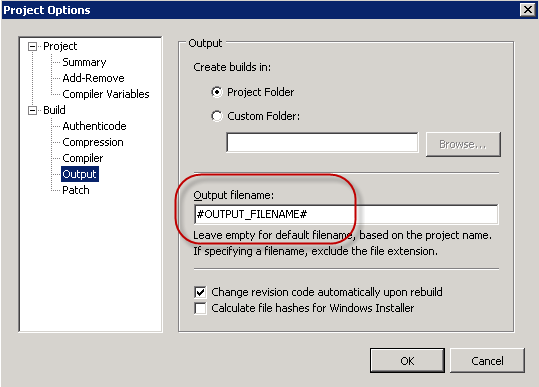
- Project Options - Output filename
- CompilerVar.png (14.08 KiB) Viewed 49229 times
Has anything changed in NX regarding the usage of compiler vars?
Re: IA NX - Compiler vars and commandline not working
Posted: Fri Aug 24, 2012 7:18 am
by FrancescoT
Dear Bjarne,
Many thanks for reporting this.
A fix for this will be available in 24 hours.
Regards.
Re: IA NX - Compiler vars and commandline not working
Posted: Fri Aug 24, 2012 7:41 am
by ckaware
The issue doesn't seem to just affect output files.
After kitting with NX the display of $VERSION$ resolved to #VERSION#.
In NX I had to SET VARIABLE VERSION TO #VERSION# for it to show correctly.
In 2012, IA 2012 seemed to handle this internally.
Chris
Re: IA NX - Compiler vars and commandline not working
Posted: Fri Aug 24, 2012 8:04 am
by FrancescoT
As I said with my previuos email:
Many thanks for reporting this.
A fix for this will be available in 24 hours.
Regards
Re: IA NX - Compiler vars and commandline not working
Posted: Fri Aug 24, 2012 9:14 am
by sinan
I'm happy to confirm that the fix has already been posted to the license generator!
The full trial installers are also uploading and should be available before the end of the day (RTM date August 24th, as opposed to the current RTM of August 19th).
A
Big Thanks to our
very active community who found this zero-day bug

Re: IA NX - Compiler vars and commandline not working
Posted: Fri Aug 24, 2012 2:04 pm
by ckaware
Thanks,
Downloading the fix now.
To AVOID issues like this, maybe InstallAware would benefit from public Beta releases (to select developers) sort of what Flexera does for InstallAnywhere.
Chris
Re: IA NX - Compiler vars and commandline not working
Posted: Sat Aug 25, 2012 4:47 am
by Bob T Bunny
I've downloaded the new file from the license site, and my mia.exe is now dated 25 August 3:05am (I'm in New Zealand, GMT+12, hence the different date). Looking at the properties of the built setup.exe, it's still showing #PROGRA for the program version, which is where we're using the compiler variable.
I see the miabuild.exe is still dated 19 Aug. Would that be right?
Chris and Bjarne, I'd be interested to know whether it's working for you.
Regards,
Bob T
Re: IA NX - Compiler vars and commandline not working
Posted: Sat Aug 25, 2012 11:51 pm
by Bjarne
I'm sad to report that the update behaves identical to the previous version.
I checked and compared the newly regenerated license file to the previous one and they are not equal in size just to make sure I've got the latest one ( it would have been nice to see a version stamping on the license file tho...)
So back to the drawing board dudes n dudettes at r&d

Re: IA NX - Compiler vars and commandline not working
Posted: Sun Aug 26, 2012 4:47 pm
by casic
I can confirm, that the problem with the compiler vars has been solved with version 8.24.12.
Maybe you have a browser caching problem...
Cu
Markus
Re: IA NX - Compiler vars and commandline not working
Posted: Sun Aug 26, 2012 6:18 pm
by Bob T Bunny
Hi Markus,
I can confirm that I don't have a caching issue (in my instance). As per my previous post, the file date for miae.exe has been updated after the 2nd license install. I also used a different browser between downloads (firefox initially, internet explorer the 2nd time, just to see if IE was supported yet).
The license install files were also different sizes (like bjarne).
Regards,
Bob
Re: IA NX - Compiler vars and commandline not working
Posted: Mon Aug 27, 2012 12:35 am
by Bjarne
casic wrote:I can confirm, that the problem with the compiler vars has been solved with version 8.24.12.
Maybe you have a browser caching problem...
Cu
Markus
I've downloaded the license yet again, but it still fails, are you really sure you running NX?
This is the third license file downloaded and all three are different in size...
Re: IA NX - Compiler vars and commandline not working
Posted: Mon Aug 27, 2012 6:44 am
by FrancescoT
If you still have problem, Please try to reinstall InstallAware NX using the setup package actually available from our download page.
Regards
Re: IA NX - Compiler vars and commandline not working
Posted: Mon Aug 27, 2012 11:57 am
by Bjarne
Wheheeyy! After reinstalling the main installer it works! The installer has indeed been updated as the PVU was invoked

Brilliant!

Side note: Why isn't IA's own installer preserve the settings on updates, at least as default? It's somewhat cumbersome as is...
Re: IA NX - Compiler vars and commandline not working
Posted: Mon Aug 27, 2012 12:08 pm
by FrancescoT
happy the you solved!
I will forward your one billion dollars question to dev team.
Regards
Re: IA NX - Compiler vars and commandline not working
Posted: Mon Aug 27, 2012 9:20 pm
by Bob T Bunny
3 hours of download, 25 mins of installation, plus setting up my preferences again, and I can also confirm that the compiler variables are working again.
Back a year ago, I posted
http://www.installaware.com/forum/viewt ... f=2&t=6405 asking if an InstallAware installation could remember your preferences - things like the "multiple instance" option, and selecting the previous version type (e.g. Studio) as the default for the next installation. Glad someone else is thinking the same.
Maybe InstallAware could also deliver patches? I like the single file installation because it gets it out of the way and I know that when I come to install it, everything is there. But having to download the whole thing a second time is a pain.
It seems the miabuild.exe has been updated in the full install, but isn't in the license file, which could explain why our license update alone didn't work.
Thanks for getting it fixed - that's the main thing :-]
Bob T