Page 1 of 1
Turn off Glass in command line build?
Posted: Sun Aug 26, 2012 7:09 pm
by rev23dev
Is there a way in IA2012 to turn off the glass effect in the command window when doing command builds? You can't see the text in Windows 8 because there is no glass so the background is white with white text.
Re: Turn off Glass in command line build?
Posted: Mon Aug 27, 2012 1:09 am
by bokkie
We had asked for this a while ago but it seems it's not possible in IA 2012.
Re: Turn off Glass in command line build?
Posted: Mon Aug 27, 2012 6:57 am
by FrancescoT
Dear user,
actually it is not possible.
Regards
Re: Turn off Glass in command line build?
Posted: Mon Aug 27, 2012 12:20 pm
by rev23dev
Ughh... that's too bad.
I don't get why it's there anyways? It doesn't add anything-- it's always been slightly obnoxious on Windows 7, and now on Windows 8 its very flawed.
Re: Turn off Glass in command line build?
Posted: Tue Aug 28, 2012 2:42 am
by FrancescoT
Dear rev23dev,
which build of Win 8 are you using?
This is what I have on my win 8:
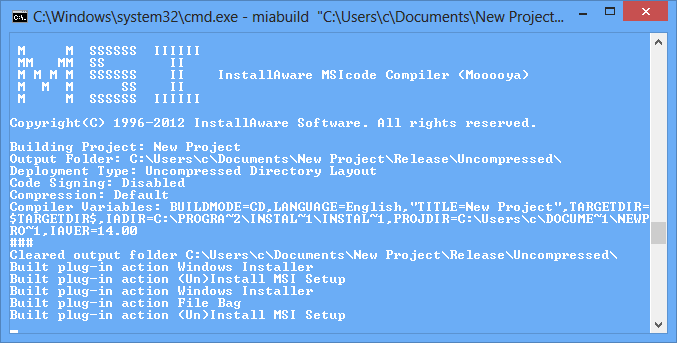
- untitled.PNG (19.29 KiB) Viewed 8988 times
Regards
Re: Turn off Glass in command line build?
Posted: Mon Sep 03, 2012 9:34 am
by rev23dev
I am using RTM Pro from my MSDN account... but my window colors are White (because it looks better than the default blue

)
Re: Turn off Glass in command line build?
Posted: Mon Sep 03, 2012 10:10 am
by FrancescoT
Dear rev23dev,
We are using the same Win 8 version ... but I haven't changed my windows colors ... very probably this is the cause.
How do you have set the colors precisely?
Regards
Re: Turn off Glass in command line build?
Posted: Mon Sep 03, 2012 6:16 pm
by rev23dev
It's definitely the cause.
On Desktop right click and select personalize.
At the bottom of the Personalization window click "Color"
I have selected Color 15 (the very last one)
Re: Turn off Glass in command line build?
Posted: Tue Sep 04, 2012 9:37 am
by FrancescoT
Dear rev23dev,
So ... actually we can't do that much with it.
Regards
Re: Turn off Glass in command line build?
Posted: Thu Sep 06, 2012 1:29 pm
by rev23dev
You can modify InstallAware to not explicitly apply this effect