Page 1 of 1
Get IIS Index returns 0
Posted: Wed Mar 06, 2013 8:23 am
by Bo Andersen
Hi Guys,
I hope you can help me.
My project has a dialog that asks which IIS site to install to.
As my debug shows, the selected value is returned in a variable $XWEBSITE$ - the site name is correctly shown.
In my line 179, I try to resolve the name to the IIS INDEX using, but the returned value is 0
Code: Select all
~InstallAware Clipboard Data~
~Get IIS Site Index~
~{44AEF6CA-BD61-4D74-AD54-DEAE2DD58BB2}~
~$XWEBSITE$~
~XSITENO~
What am I missing?
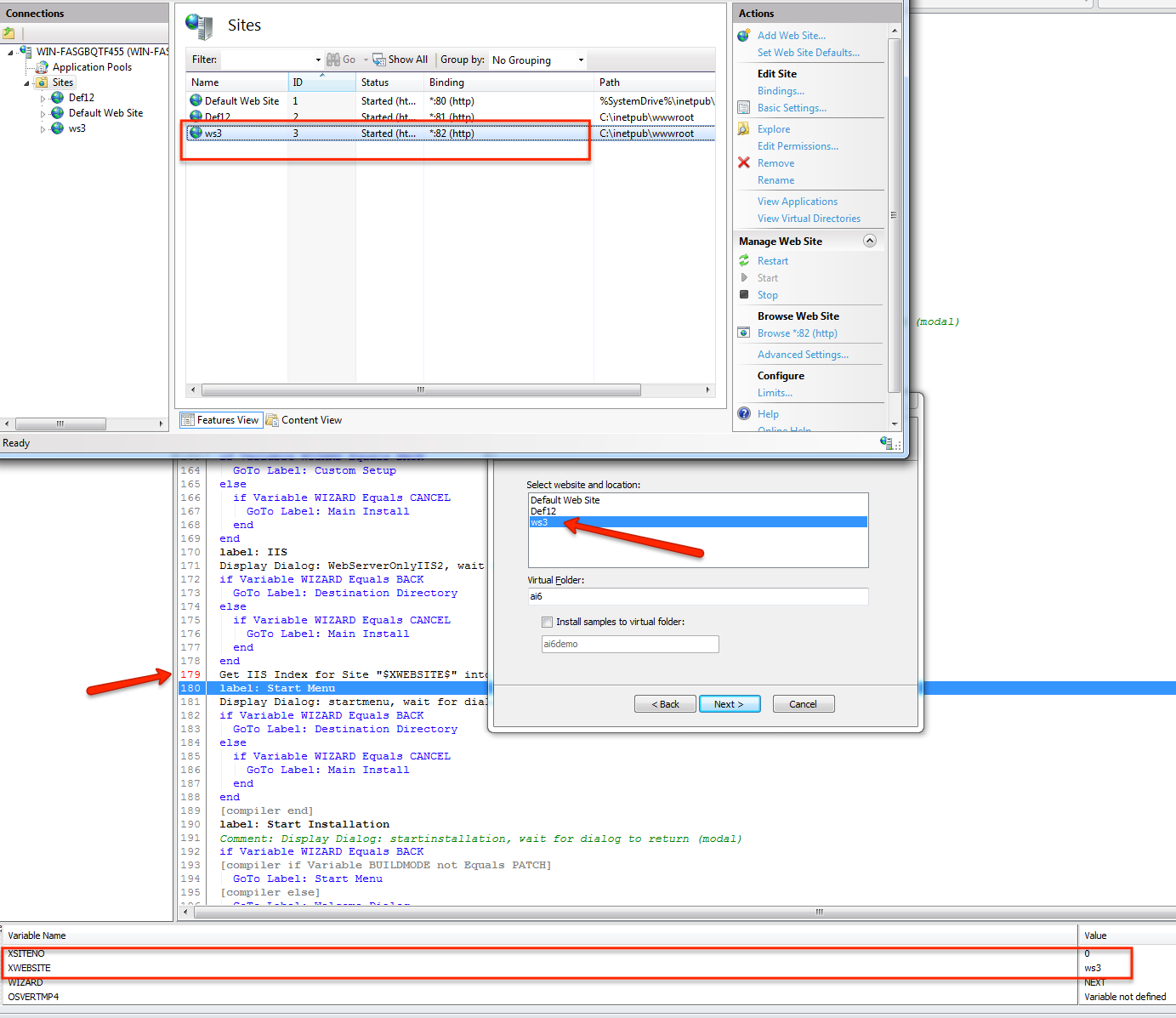
- Screenshot
- 2013-03-06_1533.png (203.8 KiB) Viewed 8184 times
Best regards
Bo Andersen
Re: Get IIS Index returns 0
Posted: Wed Mar 06, 2013 12:42 pm
by FrancescoT
Dear Bo,
Honestly, I used the code below and works fine for me.
The command correctly return the Site Index for the given web site.
Obviously, I have created a test Web Site named "MyTestWeb" before to run the code below.
Code: Select all
~InstallAware Clipboard Data~
~MessageBox~
~{931118AF-E4B7-4A98-A348-DDE9ECCE130E}~
~~
~XSITENO=$XSITENO$~
~0~
~1~
~~
~Get IIS Site Index~
~{A5E1062F-FD87-450C-8C20-7F9A2776BDC7}~
~$MYSITE$~
~XSITENO~
~Set Variable~
~{B6E0603F-681F-4E82-A0A6-3AAF2367DC5E}~
~XSITENO$MYAH$MYAH$FALSE~
~~
~Set Variable~
~{2FB80A3C-E1E6-4740-9726-8A6EB6C6E9A8}~
~MYSITE$MYAH$MYAH$FALSE~
~MyTestWeb~
Regards
Re: Get IIS Index returns 0
Posted: Thu Mar 07, 2013 3:39 am
by Bo Andersen
Hi Francesco,
I can recreate the problem in the sample IIS project.
The get IIS Index returns 0 if the site name comes from a listbox rather than a combobox.
Here's what I did:
openend the
Code: Select all
~InstallAware Clipboard Data~
~Comment~
~{BFA8C996-3643-4703-A87A-A11A957EEEEB}~
~Creating IIS Websites and Virtual Folders Example~
Edit the "Wizard" dialog
Add a listbox, populate from $SITELIST$, write to variable WS2
declare variable WS2 same place as WEBSITE is declared
Code: Select all
~InstallAware Clipboard Data~
~Set Variable~
~{067BC46C-3844-4466-97A8-AAC114C14234}~
~WS2$MYAH$MYAH$TRUE~
~~
~Set Variable~
~{C5451F22-8E4F-4700-80C5-6A6E631B1932}~
~WEBSITE$MYAH$MYAH$TRUE~
~~
~Comment~
~{54A2CE54-0B67-45DF-B457-F3A565C6F0A5}~
~On first-time run, define these variables as persistent - so setup remembers their values upon restart for maintenance or repair operations~
Create watch for WS2 and WEBSITE
Copy line where website name is resolved to IDX
Code: Select all
~InstallAware Clipboard Data~
~Get IIS Site Index~
~{970999A8-6B13-45D0-A823-6DF30451D757}~
~$WS2$~
~WIX~
~Get IIS Site Index~
~{4F2974F0-7182-4107-BF43-E4D7DDF236E3}~
~$WEBSITE$~
~WEBSITEINDEXVAR~
create debug build and debug.
Value of WS2 is "Def12"
Value of WEBSITE is "Def12"
(according to watch list)
Get IIS Index for Site "$WEBSITE$" into WEBSITEINDEXVAR
-returns 2
Get IIS Index for Site "$WS2$" into WIX
-returns 0
Now, I know that I can just use a combobox instead of a list box, but why?
Best regards
Bo
Re: Get IIS Index returns 0
Posted: Thu Mar 07, 2013 8:37 am
by FrancescoT
Dear Bo,
could you please send me the test project you used?
... I know, I can reproduce the same using the code you posted, but if you post it I will save some time

.
Many thanks for your cooperation.
Regards
Re: Get IIS Index returns 0
Posted: Thu Mar 07, 2013 8:42 am
by Bo Andersen
Here you go

Best regards
Bo
Re: Get IIS Index returns 0
Posted: Thu Mar 07, 2013 8:44 am
by FrancescoT
Thank you Bo!
I will be back as soon as possible.
Regards.
Re: Get IIS Index returns 0
Posted: Fri Mar 08, 2013 10:07 am
by FrancescoT
Dear Bo,
You found this behaviour because the value returned by the ListBox selection, contains an extra "space" character at the end of the string.
I have removed it and the "Get IIS Index" command now returns the correct index.
Please have a look at the attached project, I have added some messageboxes to display the variables value at runtimes.
Regards