Page 1 of 1
$PROGRAMFILES$ not assigned a value
Posted: Tue Oct 02, 2007 1:02 pm
by Ron Wyman
Hi All,
For some reason the var $PROGRAMFILES$ is not getting translated when the setup has been complied and run. I have made no customization to the MSICode as I am new to the product but on then Destination screen I'm seeing $PROGRAMFILES$\\My Product's name as a default location for the end user. Any help is appreciated.
Also the remaing Diskspace on the same screen reads -56,381,505 bytes whats with this?
Ron Wyman
Posted: Tue Oct 02, 2007 6:08 pm
by rickrat
try $TARGETDIR$ which equates to $PROGRAMFILES$\\$TITLE$
Rick
Posted: Tue Oct 02, 2007 7:01 pm
by Ron Wyman
Thanks for the reply Rick,
But I have not touch the MSICode this should just work. I think the $PROGRAMFILES$ has been removed some how as I do not see it on the target folders list any more. Any idea as to how to get it back?
Thanks
Ron
Posted: Tue Oct 02, 2007 7:20 pm
by rickrat
You just have to edit that dialog and change it to $TARGETDIR$.
Rick
Posted: Tue Oct 02, 2007 8:43 pm
by Ron Wyman
Thanks for the help Rick but I bit the bullet and start the project over. I didn’t want to worry about this in the future.
Thanks again and I hope I can return the help in the future.
P.S. I think IA needs a few more maintenance release as there a few issues like this I came across. More QA testing!
Re: $PROGRAMFILES$ not assigned a value
Posted: Thu Aug 02, 2012 11:23 am
by norbertjurkiewicz
I am having the exact issue, $PROGRAMFILES$ is no getting assigned a value.
My MSI code looks like this.
Code: Select all
Set Variable TARGETDIR to $PROGRAMFILES$\$COMPANY$\$TITLE$
The runtime result is
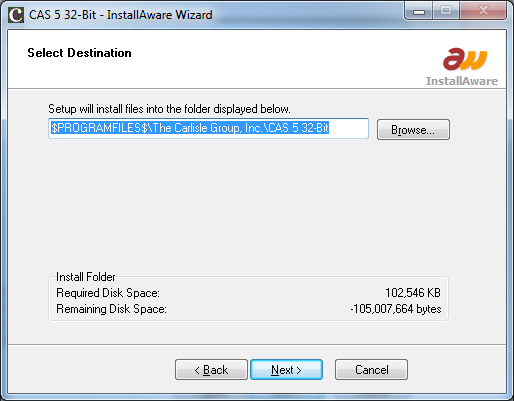
- example of untranslated var
- Untitled.png (39.33 KiB) Viewed 13896 times
Build:
IA2012 Moooya.9.26.11
I should also mention, the initial script was generated using the project wizard and I didn't modify any of the MSI directly. Doing a search in the MISCode doesn't show the $PROGRAMFILES$ being assigned anywhere.
Re: $PROGRAMFILES$ not assigned a value
Posted: Thu Aug 02, 2012 1:32 pm
by norbertjurkiewicz
I was able to use this as a workaround
Code: Select all
  Get Folder Location System->Program Files Directory into PGFILES
  Set Variable TARGETDIR to $PGFILES$\$COMPANY$\$TITLE$
However, I'd like to understand why the otherway isn't working if it comes up with other variables.
Re: $PROGRAMFILES$ not assigned a value
Posted: Fri Aug 03, 2012 8:16 am
by FrancescoT
Dear User,
What happens if you create a new project from scratch?
Anyway, I haven't found this issue.
Regards
Re: $PROGRAMFILES$ not assigned a value
Posted: Fri Aug 03, 2012 8:20 am
by norbertjurkiewicz
This was created from scrach using the wizard. I don't relaly want to start another one and go through all the cusomizations beacuse I almost have it where I need it. It looks like I'm having issues with the "Get Folder Location" variables that should be predefined but are not.
http://www.installaware.com/forum/viewt ... f=2&t=8744
Thank you.
Re: $PROGRAMFILES$ not assigned a value
Posted: Fri Aug 03, 2012 9:57 am
by FrancescoT
Dear User,
I have just tried to replicate your issue using th wizard ... but works fine.
Probably exist something else that causes your issue ... I really do not know.
Regards
Re: $PROGRAMFILES$ not assigned a value
Posted: Mon Aug 06, 2012 3:45 am
by tzachk
Just a thought,
Did you make sure that you use $PROGRAMFILES$ after it was initialized?
If you opened the dialog before you initialized the parameter, you'll get $PROGRAMFILES$ instead of the actual path to Program Files.
Regards,
T.