Page 1 of 2
Issues with admin privs/Run as Administrator
Posted: Thu Jul 15, 2010 5:00 pm
by keith
Hello,
I have an IA 9 installer that requires admin privs, and which uses "Run Program." On vista/win7 some "Run Program" calls fail due to insufficient privs UNLESS the user launches the installer using "Run as Administrator."
In both the success and failure cases the following System Settings are returned:
Administrator Rights: TRUE
Vista UAC Elevation: TRUE
User Priviledge Level: ADMIN
I thought that IA - if elevated - launched all external processes elevated as well (hence the de-elevate ability in Run Program As) so I'm a bit confused about the difference in behavior.
Is there any way I can detect if the user has launched using "Run as Administrator" or not? Is there a workaround for this type of issue?
Thanks!
Re: Issues with admin privs/Run as Administrator
Posted: Fri Jul 16, 2010 7:24 pm
by mills
According to the permission levels noted, it appears as if there should be no problem.
The only thing that I could think of off hand is that you may actually be using the
Run Program As command with the option "Run under limited user accound when UAC is enabled and setup is elevated (de-elevation)" checked. Make sure that isn't checked...
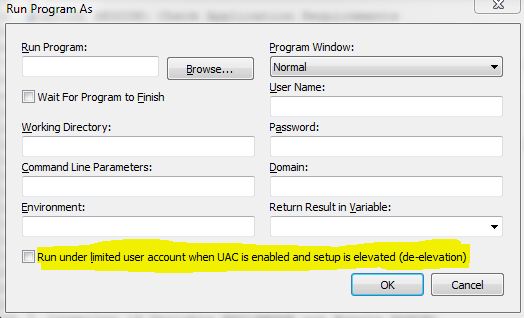
- run_under_limited_user_UAC.JPG (36.75 KiB) Viewed 23003 times
Re: Issues with admin privs/Run as Administrator
Posted: Thu Mar 17, 2011 11:28 am
by shenjige
Hi,
My problem might be different from yours. I have IA10 express. I use all default settings to build my install package. The install target dir is c:\program files\myappfolder. My application works on xp but not on vista and win7. On vista and win 7, I have to right click my application and click "Run as administrator" to get it run.
Now I have two questions:
1. On vista and win 7 machines, what is the recommended folder for my app? I need to have full access to this folder since I use some files as data storages.
2. If I do need to leave my application and all its files in a separate folder in C drive, say: c:\MyappFolder, then how can I get around(not have to to right-click on my application and click on "Run as Administrator")?
Thanks!
gene.
Re: Issues with admin privs/Run as Administrator
Posted: Thu Mar 17, 2011 11:58 am
by giaviv
Dear Gene,
1. There is no recommended way - by default the folder is in Program Files, however you can change it to whatever best suits your needs.
2. Are your UAC notifications on or off? What did you select in the Design view -> Summary and UAC -> Requested Elevation Level?
Re: Issues with admin privs/Run as Administrator
Posted: Thu Mar 17, 2011 12:21 pm
by shenjige
Hi, Aviv,
I don't think I can load Summary and UAC. I did click on it, nothing happened. My IA10 is an express version. I am not sure if the express version has the option of opening it.
Gene.
Re: Issues with admin privs/Run as Administrator
Posted: Fri Mar 18, 2011 3:39 am
by giaviv
Dear Gene,
I apologize. Could you please send my your project to support at installaware.com?
Re: Issues with admin privs/Run as Administrator
Posted: Mon Mar 28, 2011 7:08 am
by shenjige
H, Giaviv,
Sorry for replying so late!
My project is pretty big. It is over 100M with all files inside. When you say project, do you refer to only mpr file or all files?
Thanks?
Gene
Re: Issues with admin privs/Run as Administrator
Posted: Mon Mar 28, 2011 7:25 am
by giaviv
Dear Gene,
Just send over the project files (dfm, mia, mpr and so forth) and not your actual software binaries.
Re: Issues with admin privs/Run as Administrator
Posted: Mon Mar 28, 2011 9:52 am
by giaviv
Dear Gene,
Your installer is installing files to system32, which I believe is the reason elevation is required.
If you remove those files / install them elsewhere, does that solve your problem?
Re: Issues with admin privs/Run as Administrator
Posted: Mon Mar 28, 2011 10:13 am
by shenjige
I am sorry I don't quite understand it.
I have my files installed to the system32. Some files are installed to system folder that might be what you talked about. Some files are put into the program files folder that might need elevation too. But I did try to put my files into a separate folder called "c:\emma", that didn't solve the problem. What is your suggestion that where I should put my files into when my application needs read/write to the folder?
What about that form that you suggested that I should be able to click to a text "UAC", request Elevation Level? Does my express version have that option?
Thanks!
Re: Issues with admin privs/Run as Administrator
Posted: Mon Mar 28, 2011 10:20 am
by giaviv
Dear Gene,
The Express version does not unable you to select the requested elevation level.
I will try to explain again. Your installer installs files to system32, a protected system folder.
Hence, if your installer is not run by and admin, it will fail due to insufficient privileges.
Your installation folder can be the program files one, no problems with that.
Re: Issues with admin privs/Run as Administrator
Posted: Mon Mar 28, 2011 10:53 am
by shenjige
It is bad that my express version doesn't have that elevation option. I think I have to upgrade my version soon.
I just checked my project, it seems that all my files (include all files FROM system32 folder) will be installed into one target folder that is under the program files folder on the target machine. That way I have not interaction with the system32 folder on the target machine. I didn't have any problem to install my application. As you suggested, once I put all my files in to a folder under the program files folder on the target machine, I shouldn't have any problem. But I still have the same problem, even on the same machine that I build my install package on for test.
I must have missed something there in the project file setting. I think I need further help!
Thanks!
Gene.
Re: Issues with admin privs/Run as Administrator
Posted: Mon Mar 28, 2011 10:56 am
by giaviv
Gene,
Is it possible for you to also send the actual files that you are installing to support at installaware.com?
Thanks!
Re: Issues with admin privs/Run as Administrator
Posted: Thu Mar 31, 2011 8:42 am
by giaviv
Dear Gene,
I have been informed that the Express edition does in fact provide an option to set elevation in the Summary designer.
Furthermore, writing to Program Files, just like system32, also requires elevation. It is a protected file system folder, just like system32.
Re: Issues with admin privs/Run as Administrator
Posted: Wed Aug 03, 2011 12:56 pm
by shenjige
Hi,
I think there must be something fundamentally wrong on my side! I just upgraded my express version 10 to studio version 11 hoping I can fix this problem, but I am wrong. It doesn't fix it at all! I am anxious to get my installation package made for my client, but it keeps saying that the access to the folder where my application is installed is denied. I have tried to set up "Summary and UAC" to "Never Elevate (asInvoker)". That didn't work.
I am wondering if there is anyone I can help me on that. What I need is quite simple: My application needs full control of its folder, when I install my application in clients' computer, my application should be able to read/write files in the installation folder. How can I do that on win7?
Thanks in advance!
Gene.