Page 1 of 3
Framework 4 runtime does not install correctly
Posted: Tue Sep 06, 2011 9:11 am
by gonpla
Hello,
I have InstallAware Studio 8 and I have replaced it in my installation directory gacnet20.dll file as I saw in another post because the installer did not create a service .NET Framework 4. Now I perfectly creates the installer. I added the Framework 4 runtime (which in turn adds IntallAware Client Profile) to the installer and gave me another problem in the script "checknet4aip" in which he said could not have a label inside an if. If it was to check the requirements depending on whether 64 or 32 bits, if I could fix it by removing and adding labels.
Now I have a problem that I can not solve:
Launching the installation detects that you have to install the Framework Framework 4 and 4 Client Profile. It installs perfectly, but when you start the application displays the following error message.
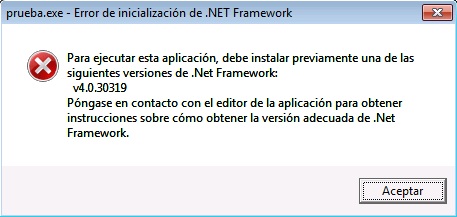
- Error
- error.jpg (37.59 KiB) Viewed 13574 times
In Windows XP works without problems, only happens to me in Windows 7 x86 and x64 Windows 7. In Windows Vista I have not tried.
If I install the original Framework 4 downloaded from the Microsoft website works perfectly.
What could I do?

Thank you.
Rubén.
Re: Framework 4 runtime does not install correctly
Posted: Tue Sep 06, 2011 12:45 pm
by giaviv
Rubén,
How did you create the .NET 4 framework runtime?
Re: Framework 4 runtime does not install correctly
Posted: Wed Sep 07, 2011 2:04 am
by gonpla
I downloaded InstallAware 12 and copy de runtimes in the installation folder.
Thanks you.
Rubén.
Re: Framework 4 runtime does not install correctly
Posted: Wed Sep 07, 2011 9:40 am
by giaviv
Ruben,
Please try running the framework binary from the bin folder (net40_bin) manually on the machine.
Does that succeed? If not, it should give you some more information about the error.
Re: Framework 4 runtime does not install correctly
Posted: Wed Sep 07, 2011 10:21 am
by gonpla
I have no "net40_bin" to catch them from InstallAware 12. I have:
- netfx_core_x86
- netfx_core_x64
- netfx_extended_x86
- netfx_extended_x64
I found this post (
http://www.installaware.com/forum/viewt ... f=2&t=5543) that appears to download the "net40_bin." Delete the current and copies them to see if it works?
Thanks you.
Rubén.
Re: Framework 4 runtime does not install correctly
Posted: Wed Sep 07, 2011 10:44 am
by giaviv
You can definitely try that - let me know if it worked out.
Re: Framework 4 runtime does not install correctly
Posted: Wed Sep 07, 2011 5:55 pm
by gonpla
Now works with the downloaded runtimes. Only I have a problem to solve:
When you install the Client Profile Framework 4 asks to reboot and restart the installation does not continue, I have to launch the installer again. Will review the scripts...
Thanks you.
Rubén.
Re: Framework 4 runtime does not install correctly
Posted: Thu Sep 08, 2011 12:08 pm
by giaviv
Ruben,
Which restart command is used? Is it Reboot Computer and Resume Setup?
Re: Framework 4 runtime does not install correctly
Posted: Mon Sep 12, 2011 5:54 am
by gonpla
The script makes the following:
Code: Select all
if Variable REBOOTNOW Equals OK
Reboot Computer and Resume Setup
Re: Framework 4 runtime does not install correctly
Posted: Mon Sep 12, 2011 8:39 am
by giaviv
That should work - could you verify that the installer does indeed get to that line?
Re: Framework 4 runtime does not install correctly
Posted: Mon Sep 12, 2011 9:49 am
by gonpla
Ok, I will put MessageBox.
Thanks.
Rubén.
Re: Framework 4 runtime does not install correctly
Posted: Tue Sep 13, 2011 5:42 am
by gonpla
Hello again,
Yes, entering the line, because if I go to the registry key "HKEY_LOCAL_MACHINE\SOFTWARE\Microsoft\Windows\CurrentVersion\Run" appears the following key:
"8F17A204" c: \ users \ user \ desktop \ iclmsv ~ 1.exe / m = "C: \ Users \ user \ Desktop \ ICLMSV ~ 1.EXE" / k = ""
If I enter "msconfig" also appears in the following image:
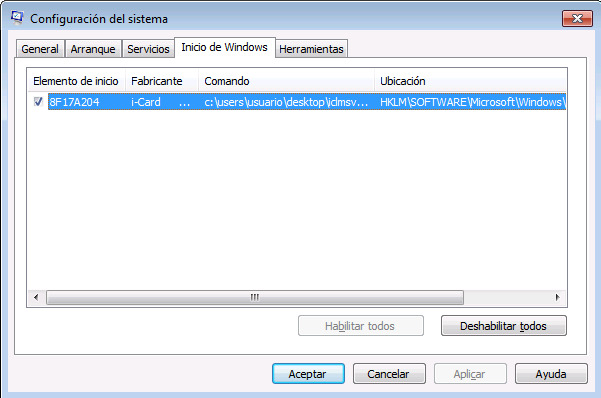
- msconfig.png (15.66 KiB) Viewed 13519 times
But to restart the computer not start.
I made another test, I added is launched at start "notepad.exe" as in the picture below and it works but not InstallAware.
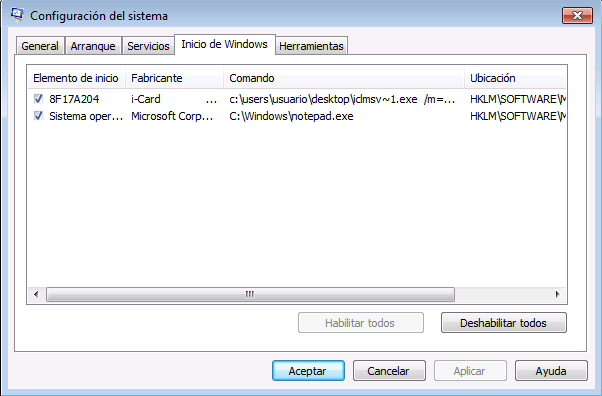
- msconfig2.png (16.77 KiB) Viewed 13519 times
What could I do?
Thank you.
Rubén.
Re: Framework 4 runtime does not install correctly
Posted: Tue Sep 13, 2011 3:12 pm
by giaviv
Ruben,
Are the any other differences you can see between the notepad running command and the IA one? Does running the IA command in CMD works?
Re: Framework 4 runtime does not install correctly
Posted: Wed Sep 14, 2011 1:12 am
by gonpla
I forgot, in Windows XP works perfectly, it is only in Windows 7.
I just try to run the command from CMD and working properly. Do not understand why you do not launch automatically at Windows startup.
Rubén.
Re: Framework 4 runtime does not install correctly
Posted: Wed Sep 14, 2011 2:48 am
by gonpla
I've found the problem, but do not know how to fix it.
If I have activated Windows 7 UAC does not work. I tried to disable it and it worked properly.
I do not know if there is any way to put parameters on the command that saves InstallAware to run with privileges to restart.
In "Summary Information" on "Vista UAC Elevation" I have checked the option "Elevate Administrators Only (highest Available)". I tried to change it to "Always Elevate (requireAdministrator)"
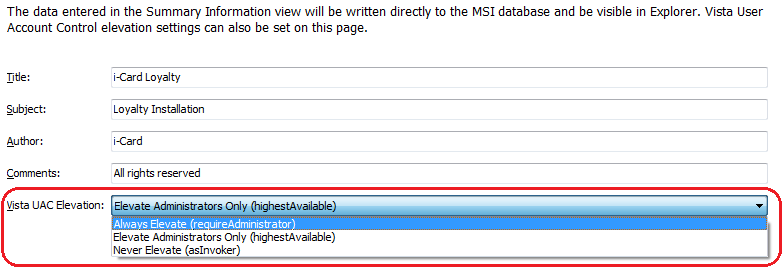
- ia2.png (15.34 KiB) Viewed 13508 times
In application requirements, also have tried to mark the "Vista User Account Control Elevation".
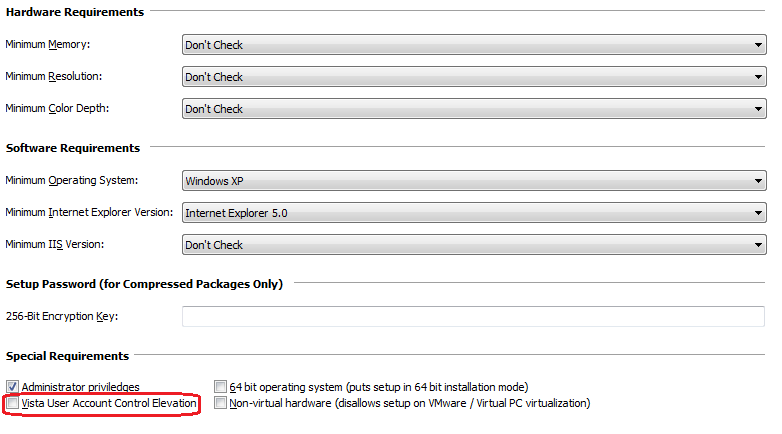
- ia1.png (21.2 KiB) Viewed 13508 times
Neither have worked. I do not know what else I can do. I have Install Aware 8, do not know if this will be corrected in Install Aware 12 ...
Thanks you.
Rubén.