
No files matching wildcard pattern

Got a problem you cannot solve? Try here.
Post Reply
stevepro
Posts: 24
Joined: Thu Oct 07, 2010 6:27 am

No files matching wildcard pattern

Post by stevepro »

Using IA 10.1

I have four machines running same IA version same exact folder tree. On two machines desktop boxes on particular installer works fine. On two other Virtual machines which are build servers the project fails with Image. We have an x86 version of the installer which works fine. I have verified the folders and files with Beyond Compare and there are not significant differences.
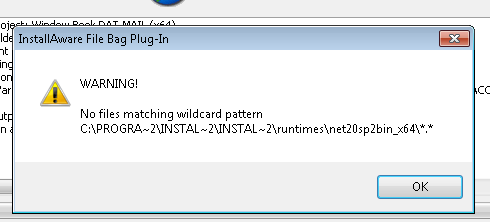
The two Virtual Machines run on VSPhere

After two days I am out of ideas, and any help would be appreciated.
stevepro
Posts: 24
Joined: Thu Oct 07, 2010 6:27 am

Re: No files matching wildcard pattern

Post by stevepro »

Duh. All the systems are running Windows 7 Professional 64 Bit
giaviv
Posts: 2039
Joined: Fri Dec 17, 2010 1:39 pm

Re: No files matching wildcard pattern

Post by giaviv »

Hi,

Could you please verify that the folder displayed DOES contain files?
Aviv Giladi
InstallAware Software

White Papers (HowTos) - http://www.installaware.com/publication ... papers.htm
Product Guides - http://www.installaware.com/publication ... guides.htm
InstallAware Help -F1 anywhere in the InstallAware IDE
stevepro
Posts: 24
Joined: Thu Oct 07, 2010 6:27 am

Re: No files matching wildcard pattern

Post by stevepro »

Yes the folder does contain the proper files just like on the two working machines.

Thanks
giaviv
Posts: 2039
Joined: Fri Dec 17, 2010 1:39 pm

Re: No files matching wildcard pattern

Post by giaviv »

stevepro,

Are you able to create a reproducing sample outside of these two machines?
Are you sure the permissions are right for that folder?
Aviv Giladi
InstallAware Software

White Papers (HowTos) - http://www.installaware.com/publication ... papers.htm
Product Guides - http://www.installaware.com/publication ... guides.htm
InstallAware Help -F1 anywhere in the InstallAware IDE
stevepro
Posts: 24
Joined: Thu Oct 07, 2010 6:27 am

Re: No files matching wildcard pattern

Post by stevepro »

On two machines like I said in the first post the project compiles just fine. These are real machines the problem machines are virtual.

As to permissions, we have an x86 version of the installer which includes .NET 2.0 sp2 which is in the runtimes folder like the x64 version and that runs fine.

I will try to make a simple installer which fails in the VSPhere environmemt as the project in question is very large.
giaviv
Posts: 2039
Joined: Fri Dec 17, 2010 1:39 pm

Re: No files matching wildcard pattern

Post by giaviv »

I have a feeling this indeed has something to do with your configuration.
Aviv Giladi
InstallAware Software

White Papers (HowTos) - http://www.installaware.com/publication ... papers.htm
Product Guides - http://www.installaware.com/publication ... guides.htm
InstallAware Help -F1 anywhere in the InstallAware IDE
stevepro
Posts: 24
Joined: Thu Oct 07, 2010 6:27 am

Re: No files matching wildcard pattern

Post by stevepro »

I found the issue
Soemhow the predefined compiler variables like
TARGETDIR
BUILDMODE
LANGUAGE
TITLE
IADIR
PROJDIR
IAVER

where redefined in Project Options > Compiler Variables all at the end of the list.

Thanks for your help in anycase.
giaviv
Posts: 2039
Joined: Fri Dec 17, 2010 1:39 pm

Re: No files matching wildcard pattern

Post by giaviv »

Sure! Glad it was resolved.
Aviv Giladi
InstallAware Software

White Papers (HowTos) - http://www.installaware.com/publication ... papers.htm
Product Guides - http://www.installaware.com/publication ... guides.htm
InstallAware Help -F1 anywhere in the InstallAware IDE
Post Reply