Default dialog showing white background when changing dimensions

Got a problem you cannot solve? Try here.
Post Reply
ntroncoso
Posts: 5
Joined: Tue Apr 14, 2020 11:51 am

Default dialog showing white background when changing dimensions

Post by ntroncoso »

I need to add an additional field to the update_setup_schedule dialog. I added this to the bottom of the dialog, but it didn't have room. So, increased the height of the dialog. When running the installer, it is showing white at the bottom of the dialog. See the image below. I attempted changing both the ClientHeight and the normal Height properties, but they both do the same thing. I tried messing with the Color, but it still shows the white at the bottom.
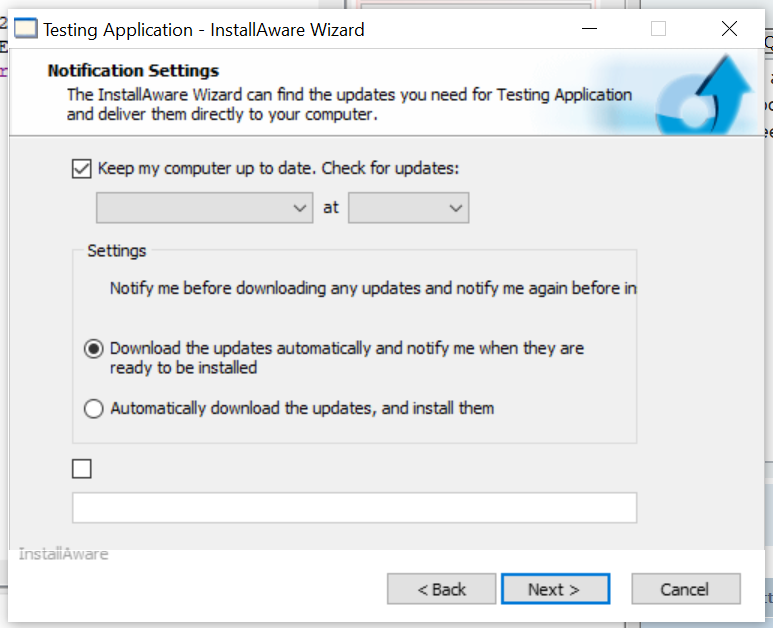
Image

Thanks in advance!
FrancescoT
Site Admin
Posts: 5361
Joined: Sun Aug 22, 2010 4:28 am

Re: Default dialog showing white background when changing dimensions

Post by FrancescoT »

The white area at bottom of the dialog, it's controlled by the VistaGlass Control.

You can modify such size from Dialog control. Load the dialog, select the "VistaGlass Control", and then set as you prefer the value of the "GlassBottom" property.
Francesco Toscano
InstallAware Software

White Papers (HowTos) - http://www.installaware.com/publication ... papers.htm
Publications - http://www.installaware.com/publications-review.htm
InstallAware Help -F1 anywhere in the InstallAware IDE
ntroncoso
Posts: 5
Joined: Tue Apr 14, 2020 11:51 am

Re: Default dialog showing white background when changing dimensions

Post by ntroncoso »

Thank you very much. That solved my issue
Post Reply
