Setting check list box values as "checked" by default

Got a problem you cannot solve? Try here.
Post Reply
chakresh
Posts: 14
Joined: Mon Mar 07, 2011 6:39 am

Setting check list box values as "checked" by default

Post by chakresh »

Hi,

I am setting the items in the check list box dynamically at run time.

My requirement is to set the value of these items as "checked" by default.How I can do this , I am unable to find any property which can be modified to set the values as "checked" by default.

Please help if anyone has any idea.

Thanks . :)
giaviv
Posts: 2039
Joined: Fri Dec 17, 2010 1:39 pm

Re: Setting check list box values as "checked" by default

Post by giaviv »

Dear chakresh,

You will need to check the actual button that you want checked by default and set it's variable to TRUE in the script.
Aviv Giladi
InstallAware Software

White Papers (HowTos) - http://www.installaware.com/publication ... papers.htm
Product Guides - http://www.installaware.com/publication ... guides.htm
InstallAware Help -F1 anywhere in the InstallAware IDE
chakresh
Posts: 14
Joined: Mon Mar 07, 2011 6:39 am

Re: Setting check list box values as "checked" by default

Post by chakresh »

Hi Giaviv,

Thanks for the reply , can you elaborate little more that how I need to proceed on this, step by step and what exactly I need to change in the script ( "set it's variable to TRUE in the script" )

Let me explain what exactly I am trying to do .I am creating a string separated by new line characters and then setting it into the checklistbox control using a variable, this list at run time becomes the items of the checklistbox control.

Now these item are unchecked , and user wants them to be checked by default.

Thanks :)
giaviv
Posts: 2039
Joined: Fri Dec 17, 2010 1:39 pm

Re: Setting check list box values as "checked" by default

Post by giaviv »

Dear chakresh,

Could you please attach here the script that you are using to populate the checklistbox?
Aviv Giladi
InstallAware Software

White Papers (HowTos) - http://www.installaware.com/publication ... papers.htm
Product Guides - http://www.installaware.com/publication ... guides.htm
InstallAware Help -F1 anywhere in the InstallAware IDE
chakresh
Posts: 14
Joined: Mon Mar 07, 2011 6:39 am

Re: Setting check list box values as "checked" by default

Post by chakresh »

Hi, This is how my code looks like.

Comment: To get a comma separated list of DSN names and replace comma with newline char.
Read from Text File C:\DSNList.txt into Variable CHECKLISTBOXSTRING (get EOF into SUCCESS)
Replace , with $NEWLINE$ in variable CHECKLISTBOXSTRING
Display Dialog: DisplayDSNList, wait for dialog to return (modal)

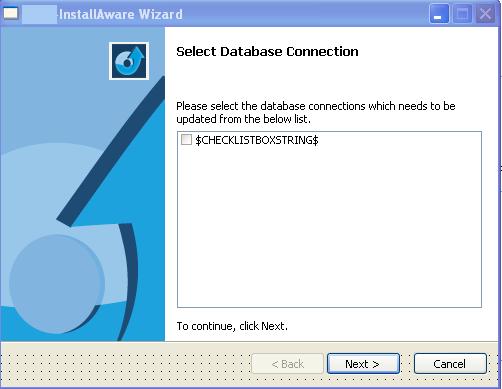
the above variable is set into the checklistbox control on the screen
this is how it looks in development environment
img1.JPG
img1.JPG (26.2 KiB) Viewed 11198 times
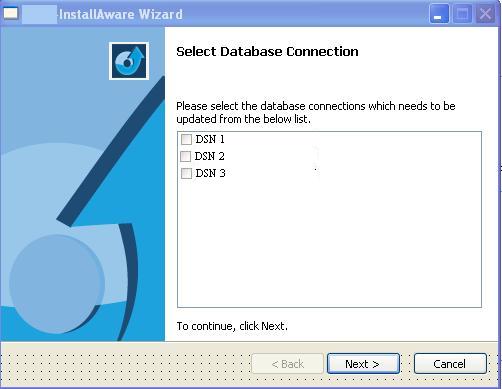
and this is how it looks at runtime
img2.JPG
img2.JPG (26.23 KiB) Viewed 11198 times

now user wants all the above items as checked by default.

giaviv
Posts: 2039
Joined: Fri Dec 17, 2010 1:39 pm

Re: Setting check list box values as "checked" by default

Post by giaviv »

Dear chakresh,

Please send your project (or just the dialog and the script) to support at installaware.com. Thanks!
Aviv Giladi
InstallAware Software

White Papers (HowTos) - http://www.installaware.com/publication ... papers.htm
Product Guides - http://www.installaware.com/publication ... guides.htm
InstallAware Help -F1 anywhere in the InstallAware IDE
chakresh
Posts: 14
Joined: Mon Mar 07, 2011 6:39 am

Re: Setting check list box values as "checked" by default

Post by chakresh »

Hi Aviv,

I have sent the source code at the email address given by you, please see and let me know if any input need from my side.
The source code contains the sample application in which I have implemented my functionality related to the checklistbox as discussed above.

Thanks in advance for taking out time for this, :)
Chakresh
chakresh
Posts: 14
Joined: Mon Mar 07, 2011 6:39 am

Re: Setting check list box values as "checked" by default

Post by chakresh »

Hi Aviv,

The problem has been resolved, I was missing one simple trick :) , thanks for all your help.
The mistake was that I was assigning and returning value in different variables from the checklistbox .When I took same variables in assigned value and return value for items it shows checked by default.

thanks
chakresh
giaviv
Posts: 2039
Joined: Fri Dec 17, 2010 1:39 pm

Re: Setting check list box values as "checked" by default

Post by giaviv »

Dear chakresh,

This is what you need to do before displaying the dialog:
Set Variable CHECKLISTSTRRET to DSN1$NEWLINE$DSN2$NEWLINE$DSN3$NEWLINE$DSN4

Or

~InstallAware Clipboard Data~
~Set Variable~
~{63FF2C7D-D22F-4AB3-8E18-4C254C9F2B17}~
~CHECKLISTSTRRET$MYAH$MYAH$FALSE~
~DSN1$NEWLINE$DSN2$NEWLINE$DSN3$NEWLINE$DSN4~
Aviv Giladi
InstallAware Software

White Papers (HowTos) - http://www.installaware.com/publication ... papers.htm
Product Guides - http://www.installaware.com/publication ... guides.htm
InstallAware Help -F1 anywhere in the InstallAware IDE
chakresh
Posts: 14
Joined: Mon Mar 07, 2011 6:39 am

Re: Setting check list box values as "checked" by default

Post by chakresh »

Yes, Thanks
bokkie
Posts: 767
Joined: Sun Feb 08, 2009 6:30 am

Re: Setting check list box values as "checked" by default

Post by bokkie »

Aviv,

Perhaps I'm just having a total blank but what was the objective of what this thread was meant to achieve? I sort of get the impression that it creates checkboxes dynamically at runtime? I've probably missed the point in reading it but it's a good solution...if only I could understand the problem it solves! :) Could you elaborate a little more for me?
Peter. Smartly dressed, he still resembles an unmade bed.
InstallAware MVP
chakresh
Posts: 14
Joined: Mon Mar 07, 2011 6:39 am

Re: Setting check list box values as "checked" by default

Post by chakresh »

HI,

sorry for delayed reply. :)

Yes I was trying to create check boxes at run time and was trying to keep them as checked by default.Check list Box control was a good option for doing this , but with checklist box control we cant treat each individual check box separately. Hence properties like "checked" are not available in it , which is there in a normal check box.
Post Reply