Can't create shortcut in start menu

Got a problem you cannot solve? Try here.
Post Reply
JohnBalcom
Posts: 18
Joined: Sat Oct 08, 2022 9:15 am

Can't create shortcut in start menu

Post by JohnBalcom »

I can't get a shortcut to show up in Windows 11 Start Menu. Tested OK in Windows 10.

InstallShield created the TPC Desktop 2020 link shown here under the Traverse PC folder. They make it so simple. I want IA to do the same thing.
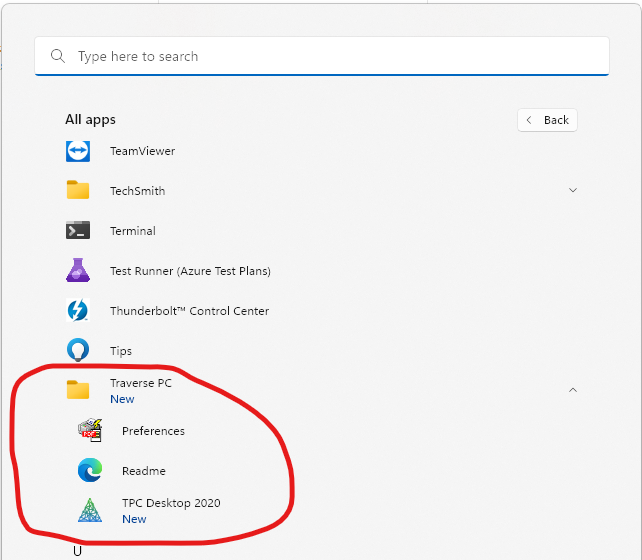
Traverse PC Folder in Start Menu.png
Traverse PC Folder in Start Menu.png (173.58 KiB) Viewed 18682 times
I've added the shortcuts I want to the IA IDE. The TPC 2019 works great. The TPC Desktop 2019 doesn't. I can't get the shortcut to show up in the start menu at all. Even if I don't put it in the Traverse PC folder.

IA Shortcuts.png
IA Shortcuts.png (62.63 KiB) Viewed 18682 times
What should this Create Shortcut dialog look like?
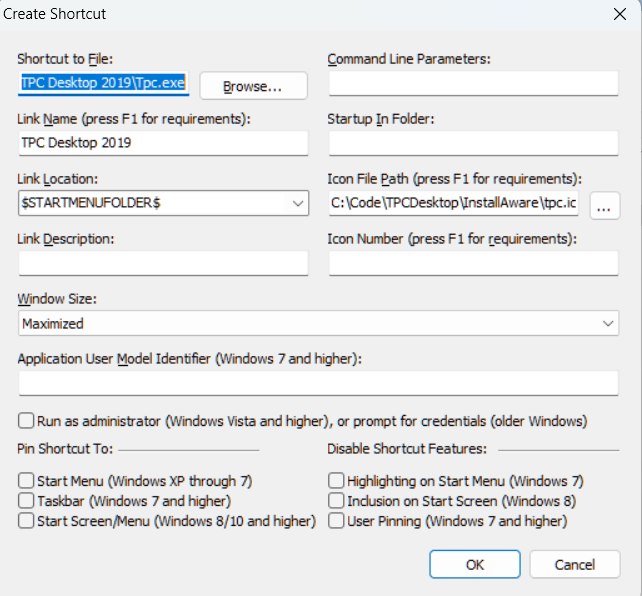
Create Shortcut Dlg.png
Create Shortcut Dlg.png (143.97 KiB) Viewed 18679 times
I tried adding the startmenu dialog and that didn't help.

Last edited by JohnBalcom on Thu Dec 08, 2022 2:36 pm, edited 3 times in total.
FrancescoT
Site Admin
Posts: 5361
Joined: Sun Aug 22, 2010 4:28 am

Re: Can't create shortcut in start menu

Post by FrancescoT »

Please have a look at the attached project. This creates a "Hello" shortcut in the Applications Start Menu Folder.
shortcut.png
shortcut.png (150.25 KiB) Viewed 18582 times
Attachments
TestPrj.zip
(2.55 MiB) Downloaded 1202 times
Francesco Toscano
InstallAware Software

White Papers (HowTos) - http://www.installaware.com/publication ... papers.htm
Publications - http://www.installaware.com/publications-review.htm
InstallAware Help -F1 anywhere in the InstallAware IDE
JohnBalcom
Posts: 18
Joined: Sat Oct 08, 2022 9:15 am

Re: Can't create shortcut in start menu

Post by JohnBalcom »

It looks like you are sending the link to the shortcut folder, but it doesn't show up in the pulldown list in the properties dialog.
No Shortcutfolder.png
No Shortcutfolder.png (63.57 KiB) Viewed 18578 times
1. Do I enter $SHORTCUTFOLDER$ manually?

2. Why isn't it in the pulldown list?

3. Where does your documentation tell me what $SHORTCUTFOLDER$? is and when to use it?

4. Why didn't IA set this up for me when it converted my InstallShield project?
JohnBalcom
Posts: 18
Joined: Sat Oct 08, 2022 9:15 am

Re: Can't create shortcut in start menu

Post by JohnBalcom »

I built your testprj and installed it. I changed a few variables to mimic what we want.

When the start menu is first opened, I see the shortcut
Test Project is there.png
Test Project is there.png (138.64 KiB) Viewed 18576 times
Then, without doing anything, after about 5 seconds, the short cut disappears
Test Project is not there.png
Test Project is not there.png (151.37 KiB) Viewed 18576 times
Reopening the start menu and rebooting the computer doesn't bring it back.

What do I do to get the shortcut to stay in the start menu?

I've attached the modified project for you to test.
Attachments
TestPrj Modified.zip
(6.35 MiB) Downloaded 1161 times
JohnBalcom
Posts: 18
Joined: Sat Oct 08, 2022 9:15 am

Re: Can't create shortcut in start menu

Post by JohnBalcom »

Update

We just tested install on another Win 11 computer and it worked OK there.

To on my Win 11 test computer
1. Our old InstallShield install create the start menu shortcuts properly
2. Our new IA installs do not
3. Same results for our IA projects and the test project you sent me.

Any suggestion on what might be going on?
JohnBalcom
Posts: 18
Joined: Sat Oct 08, 2022 9:15 am

Re: Can't create shortcut in start menu

Post by JohnBalcom »

I figured it out.

As soon as I changed the circled Pin options from Yes to No the TPC Desktop 2019 shortcut stays in the Startup Menu for Windows 11 and doesn't disappear.
Don't pin desktop shortcut.png
Don't pin desktop shortcut.png (12.51 KiB) Viewed 18561 times
I have to say that once again, I spent way too much time figuring this out. This is worked in InstallShield.

1) IA documentation is horrible - was not helpful for this at all.

2) I appreciate IA support person replying to my post but I just spent 2 more days waiting for replies and finally figured it out myself.

Yikes!!
JohnBalcom
Posts: 18
Joined: Sat Oct 08, 2022 9:15 am

Re: Can't create shortcut in start menu

Post by JohnBalcom »

This morning (the next day) 2 of the Start Menu shortcuts are missing - TPC Desktop 2019 and TPC Desktop 2022.
1. both are still installed
2. both still have icons on the desktop that work
3. both are still included in C:\ProgramData\Microsoft\Windows\Start Menu\Programs\Traverse PC
Missing 2019 and 2022.png
Missing 2019 and 2022.png (148.78 KiB) Viewed 18553 times
What is going on?
JohnGaver
Posts: 265
Joined: Mon Feb 05, 2024 6:15 pm

Re: Can't create shortcut in start menu

Post by JohnGaver »

Sorry to hear of your troubles, but this sounds more like a Start Menu bug at Microsoft's end than an InstallAware issue.

For the record, no other product can pin apps to the Start Menu at all, including the one you referenced above.
John Gaver
InstallAware Skunkworks
InstallAware Multi Platform - Liberating DEB/RPM/PKG/MSI(X) into universal native setups!
Get your free copy today - https://www.installaware.com/installawa ... atform.htm
Post Reply