Using a component in a feature tree for grouping, displaying the required space for its child components

Got a problem you cannot solve? Try here.
Post Reply
Kostya
Posts: 29
Joined: Tue Jul 25, 2017 8:09 am

Using a component in a feature tree for grouping, displaying the required space for its child components

Post by Kostya »

Hello,

In the feature selection tree, it is possible to group components:

Code: Select all

Define Component: Additional Components
Define Component: Additional Components\Component 1
Define Component: Additional Components\Component 2
Is it possible to make it so that when selecting the "Additional Components" node, the required space labels would display the space occupied by the child components? That is, so that the parent component would be used for visual grouping only.

Code: Select all

Additional Components << Selected
|__[V] Component 1 (2 MB)
|__[X] Component 2 (3 MB)

Required space: 2 MB
Total required space: 2MB
I see that I can set the parent size to "0", this will not affect the value of the total required space. But then, when it is selected, the value "0 bytes" will be displayed. And I would like to achieve that as a group it displays information about the size of its child components.

Thanks,
Kostya

JohnGaver
Posts: 265
Joined: Mon Feb 05, 2024 6:15 pm

Re: Using a component in a feature tree for grouping, displaying the required space for its child components

Post by JohnGaver »

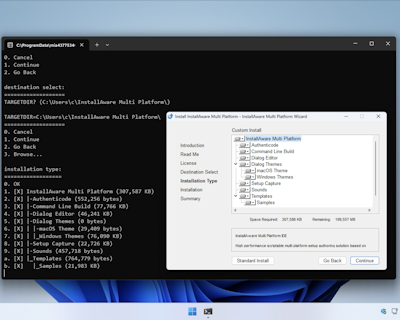
Have you checked InstallAware Multi Platform's console mode (pure command line) setup engine?

I believe that might be working in this way, it looks very similar to what you have drawn here.
John Gaver
InstallAware Skunkworks
InstallAware Multi Platform - Liberating DEB/RPM/PKG/MSI(X) into universal native setups!
Get your free copy today - https://www.installaware.com/installawa ... atform.htm
Kostya
Posts: 29
Joined: Tue Jul 25, 2017 8:09 am

Re: Using a component in a feature tree for grouping, displaying the required space for its child components

Post by Kostya »

Hi John,

If you mean what it looks like here, where the console displays a structure indicating the required space, then yes it looks like that.

Image

We are using a relatively old "InstallAware Studio X6 Creators Update", but we have the latest version too. That's what I'd like to understand:
  • 1)Could we achieve this with the current version or a newer one, but not in console mode?
  • 2)If this is not present when using the UI mode in the latest version, can we expect this feature to be added? (X components selected from Y, required space for sub-components is Z MB etc. Or like in console mode, in parentheses.)
Thanks,
Kostya
JohnGaver
Posts: 265
Joined: Mon Feb 05, 2024 6:15 pm

Re: Using a component in a feature tree for grouping, displaying the required space for its child components

Post by JohnGaver »

Thrilled to hear that helped!

1) The console mode setup engine is currently only available with InstallAware Multi Platform.

Regardless, you really shouldn't be using X6 - it is old and has known security vulnerabilities. Since you already have an X16 license, there really is no rationale to not upgrade to our latest, greatest, and secure version right away!

2) I've already added in a request, but R&D would not commit to any time frame - until features have been signed off and have become publicly available.
John Gaver
InstallAware Skunkworks
InstallAware Multi Platform - Liberating DEB/RPM/PKG/MSI(X) into universal native setups!
Get your free copy today - https://www.installaware.com/installawa ... atform.htm
Kostya
Posts: 29
Joined: Tue Jul 25, 2017 8:09 am

Re: Using a component in a feature tree for grouping, displaying the required space for its child components

Post by Kostya »

John, thanks for your reply! We will upgrade to the latest version, and I really hope that the described features will appear soon.
Post Reply